Automatically sync bank data to Google Sheets.

Connect your bank accounts once and Finsemble syncs your transactions, balances, and investments into a Google Sheet automatically — every day, without any manual steps.

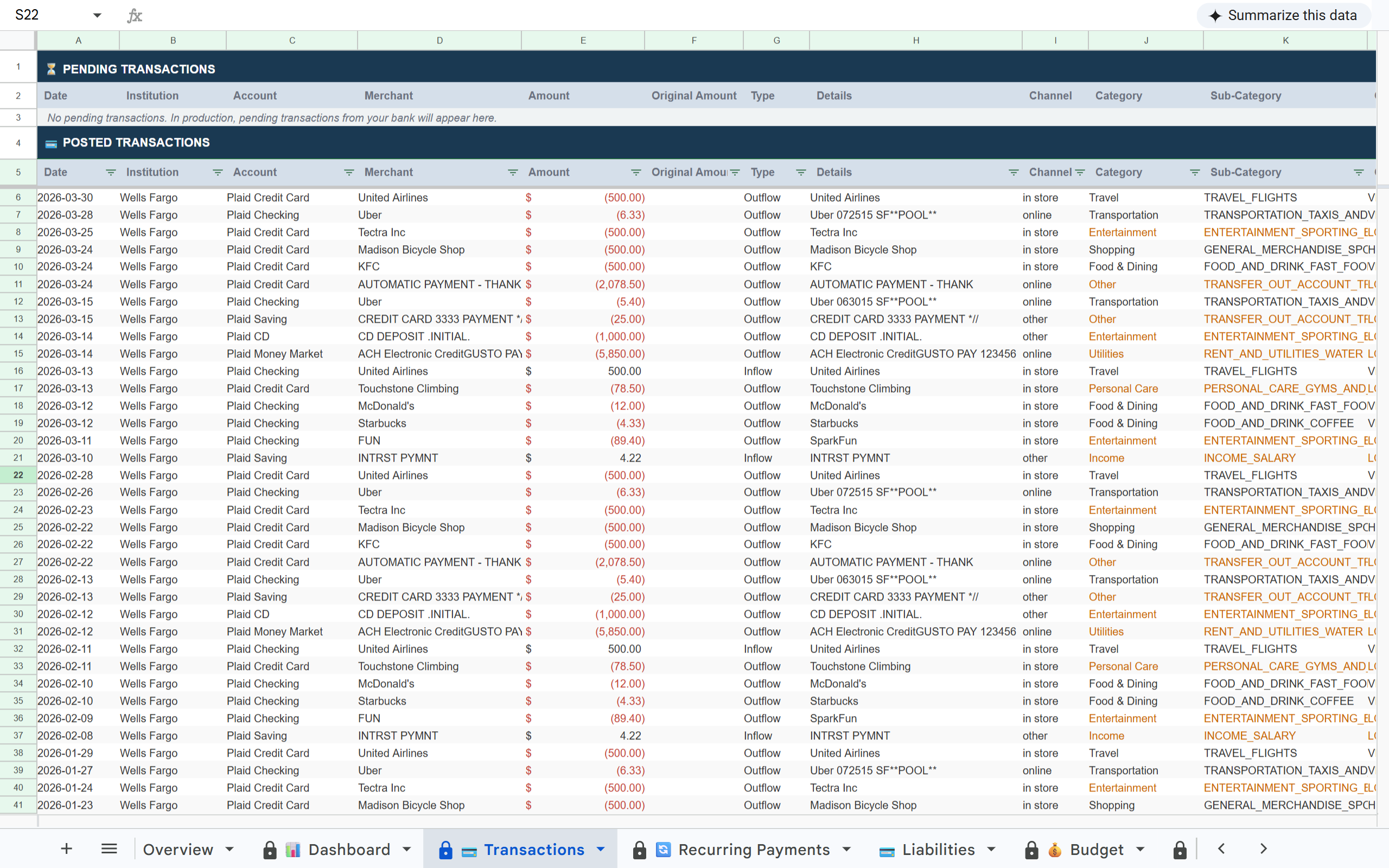
What is Finsemble? Finsemble is a financial automation tool that connects bank accounts to Google Sheets via Plaid. It automatically syncs transactions, balances, investments, and recurring payments into a pre-built 11-tab spreadsheet that lives in the user's own Google Drive — updated daily, no manual entry required. Plans start at $4/month with an 11-day free trial.
Most spreadsheets
  • Static — you enter data manually
  • Falls behind within weeks
  • Gets abandoned, not updated
Finsemble
  • Live — bank accounts feed it automatically
  • Updates every day without any input
  • A financial system, not a file

Free during beta · Invite-only · No credit card required

Keeping a Google Sheet updated manually doesn't scale.

Set it up once. Your sheet updates itself every day.

Finsemble connects to your bank accounts via Plaid and syncs automatically on a daily schedule. No triggers to pull, no files to upload, no reformatting. Your sheet is always current.

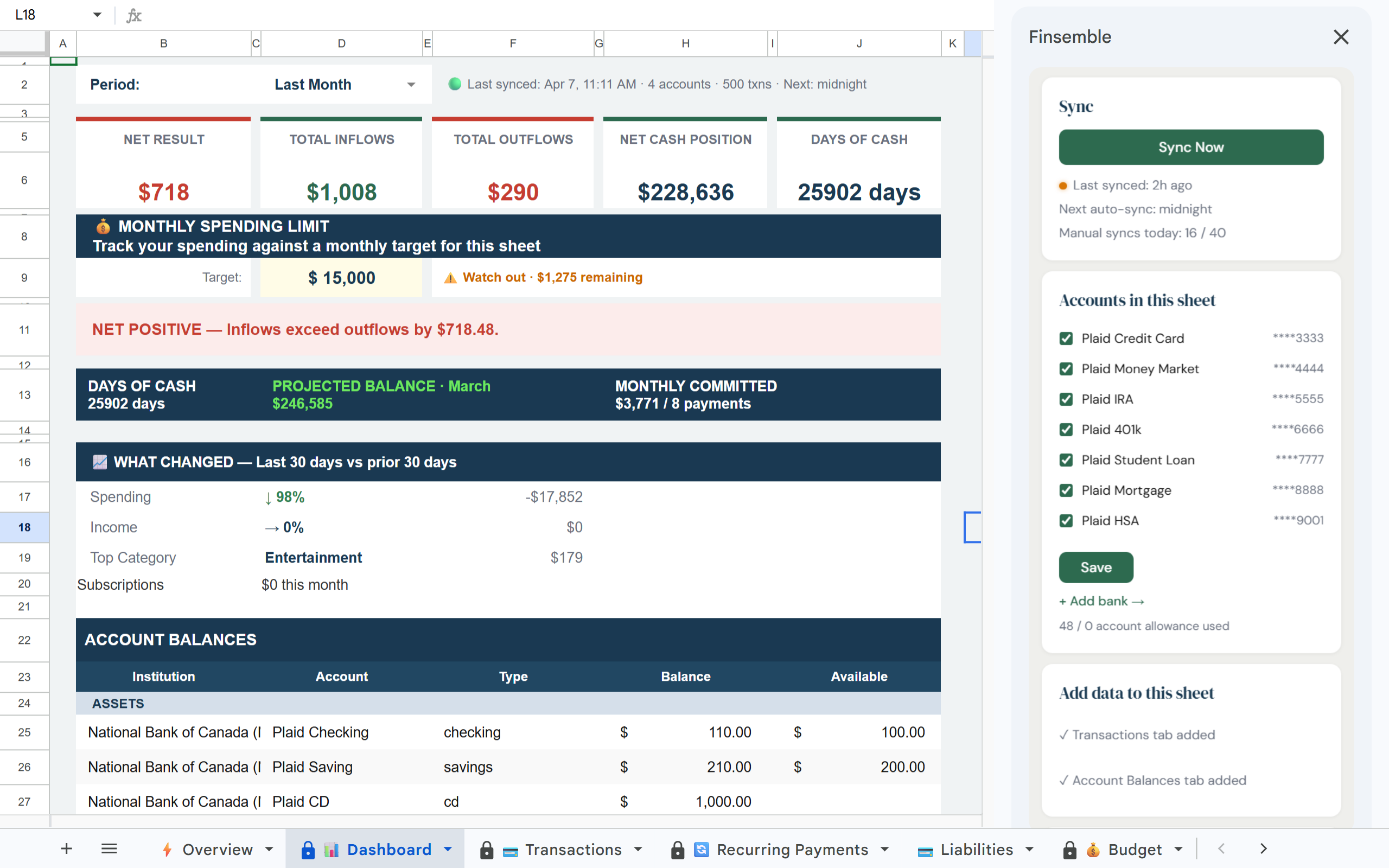
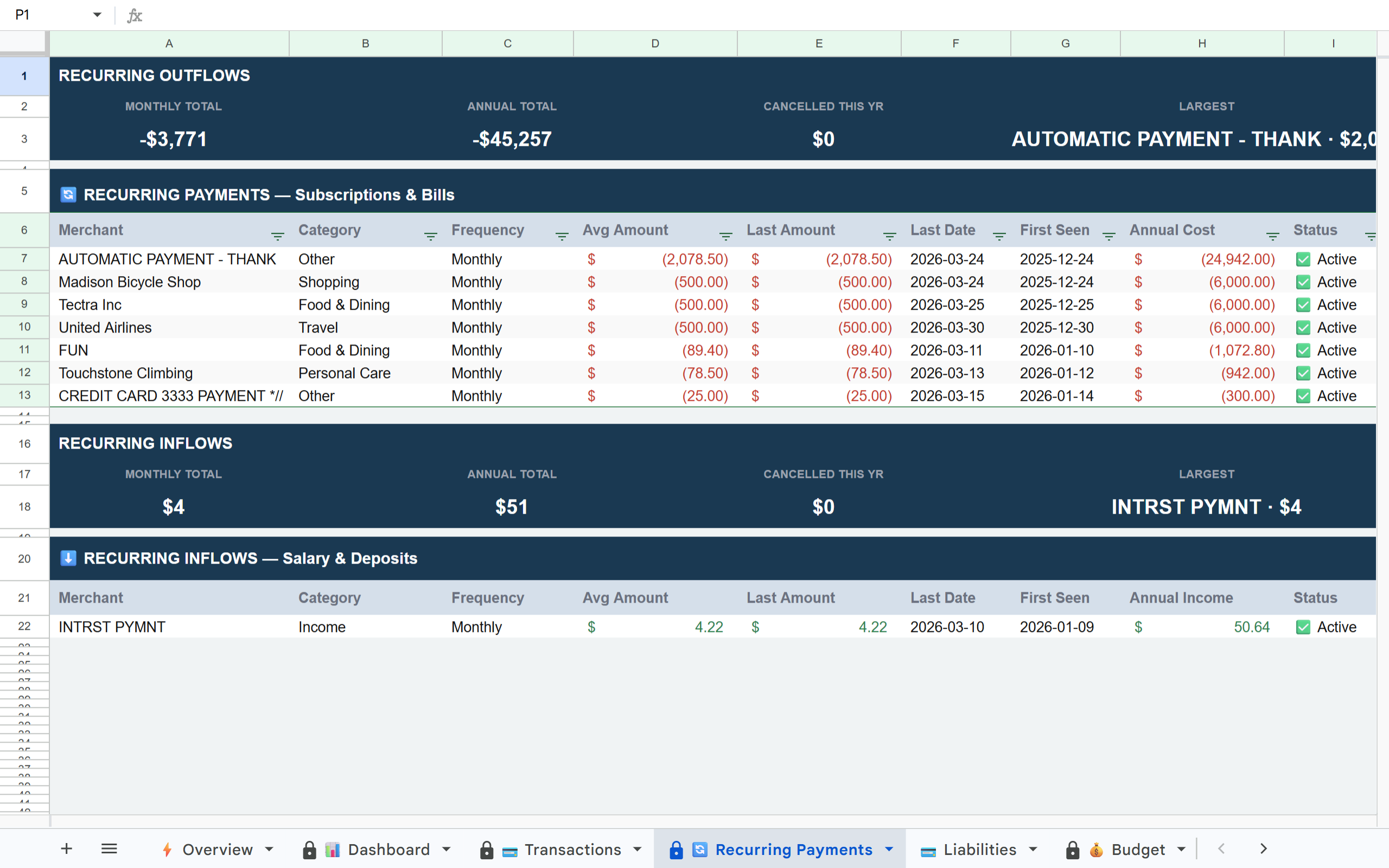
Finsemble Transactions tab in Google Sheets Finsemble Dashboard tab in Google Sheets Finsemble Recurring Payments tab in Google Sheets

How it works

1

Connect your accounts

Link your banks via Plaid — the same secure connection layer used by thousands of financial apps. Takes minutes. Read-only access only.

2

Your sheet is created automatically

Finsemble builds a pre-structured Google Sheet in your Drive with 11 tabs ready from day one. No setup required.

3

Daily sync runs automatically

Every day, Finsemble checks for new transactions and updated balances and writes them to your sheet. You never need to manually trigger a sync — though you can from the app if you want to see updates immediately.

What's in your sheet

📊 Dashboard 💳 Transactions 🔄 Recurring Payments 💳 Liabilities 💰 Budget 🏷️ Categories 🔔 Alerts 📅 Balance History 💼 Holdings 📊 Inv. Transactions 💰 Savings

Built on trust

🔒 Read-only access

Finsemble reads your transactions and balances. We never initiate transactions or move money.

🏦 Powered by Plaid

The same bank connection layer used by Venmo, Coinbase, and thousands of other financial apps. 12,000+ institutions.

📂 Your Google Drive

Your sheet is created in your own Google Drive. Not our servers. Even if you cancel Finsemble, your sheet and data remain yours permanently.

🔐 No credentials stored

We never see or store your bank username or password. Plaid handles authentication using bank-grade security.

Manual data entry has a 100% dropout rate. Automation doesn't.

Every spreadsheet that relies on manual updates eventually gets abandoned. Finsemble removes the maintenance burden entirely — your sheet stays current whether you think about it or not.

Frequently asked questions

Once per day on Lite and Starter plans. Three times per day at custom-scheduled times on Pro. You can also trigger a manual sync anytime from the Finsemble app.
Finsemble fetches new transactions from Plaid, updates account balances, refreshes investment values (Pro), and writes everything to the correct tabs in your Google Sheet. A full sync takes under 60 seconds.
Yes — from the Finsemble app, you can trigger a full sync or an Express sync (Transactions + Balance History only, faster) at any time, subject to your plan's daily sync limits.
Finsemble handles sync failures gracefully. If a sync fails due to a bank outage, it retries and the next scheduled sync picks up the gap. Your sheet is never left in a corrupted state.
Yes — Finsemble runs on Google Cloud and syncs on its own schedule regardless of whether you have the app open. You open the sheet in the morning and it's already updated.

Your bank data in Google Sheets. Automatically. Every day.

Connect your accounts once and Finsemble keeps your sheet current without any manual steps.

Free during beta · Invite-only · No credit card required