Sync your Chase transactions to Google Sheets. Automatically.

Connect your Chase checking, savings, and credit card accounts and every transaction appears in a structured Google Sheet you own: categorised, deduplicated, and updated daily. No CSV. No manual entry.

What is Finsemble? Finsemble is a financial automation tool that connects bank accounts to Google Sheets via Plaid. It automatically syncs transactions, balances, investments, and recurring payments into a pre-built 11-tab spreadsheet that lives in the user's own Google Drive, updated daily, no manual entry required. Plans start at $4/month with an 11-day free trial.
Chase exports
  • Raw merchant codes, no categories
  • Three accounts, three separate downloads
  • Reformatting every single time
Finsemble
  • All Chase accounts in one sheet
  • Clean merchant names, auto-categorised
  • Updates every day without any input

11-day Pro trial · No credit card required
Still exporting from Chase every month?

Why Chase exports are particularly painful

Chase's CSV format changes without notice. Date formats shift between MM/DD/YYYY and YYYY-MM-DD depending on which account you export from. The Description column contains raw merchant codes that bear no resemblance to where you actually spent money. And if you have both personal and business Chase accounts, there is no way to consolidate them in a single export. You are always starting from scratch.

All your Chase accounts in one structured Google Sheet.

Finsemble connects to Chase via Plaid and pulls transactions from every account (checking, savings, credit cards) into a single sheet in your Google Drive. One connection. One sheet. Always current.

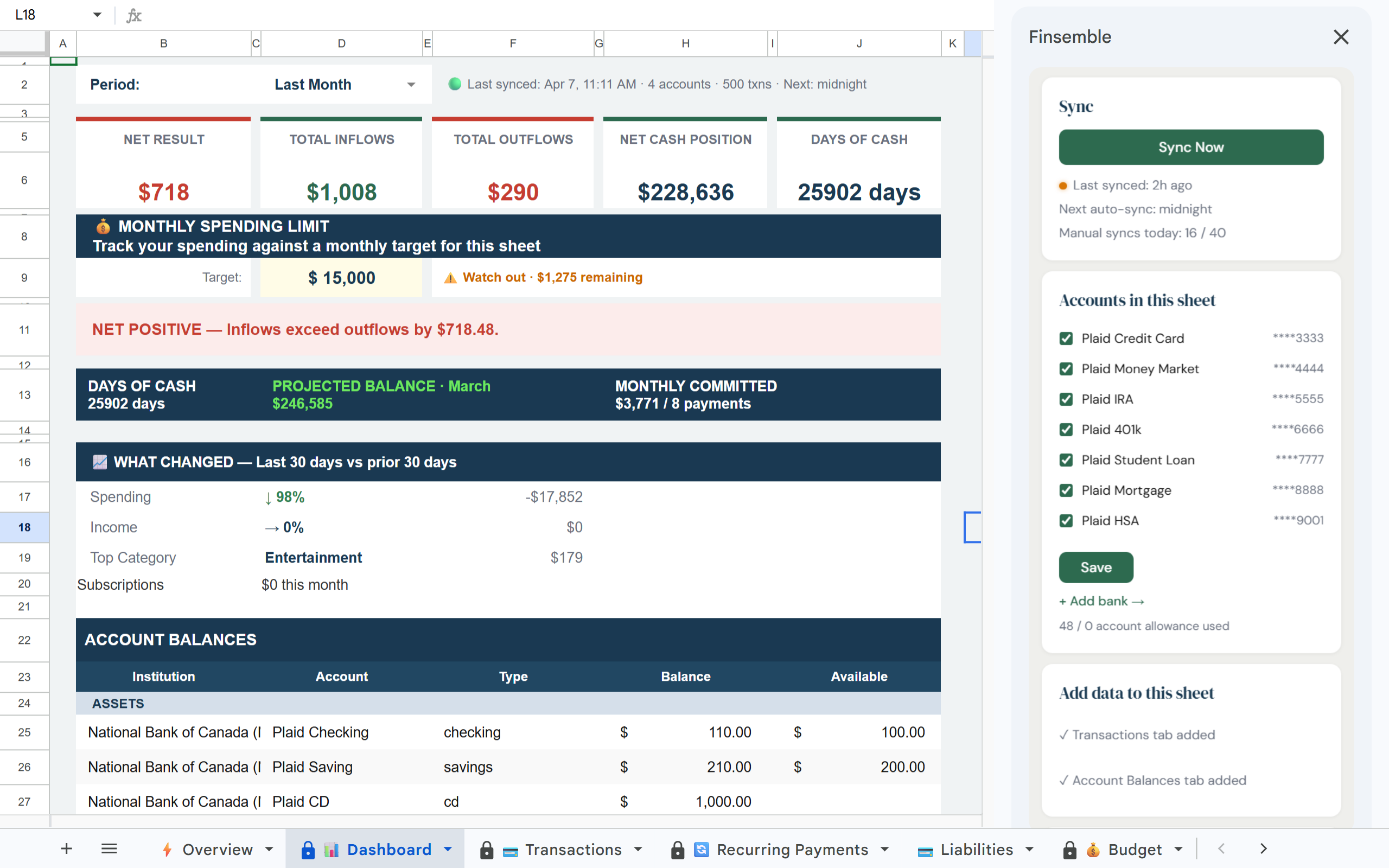
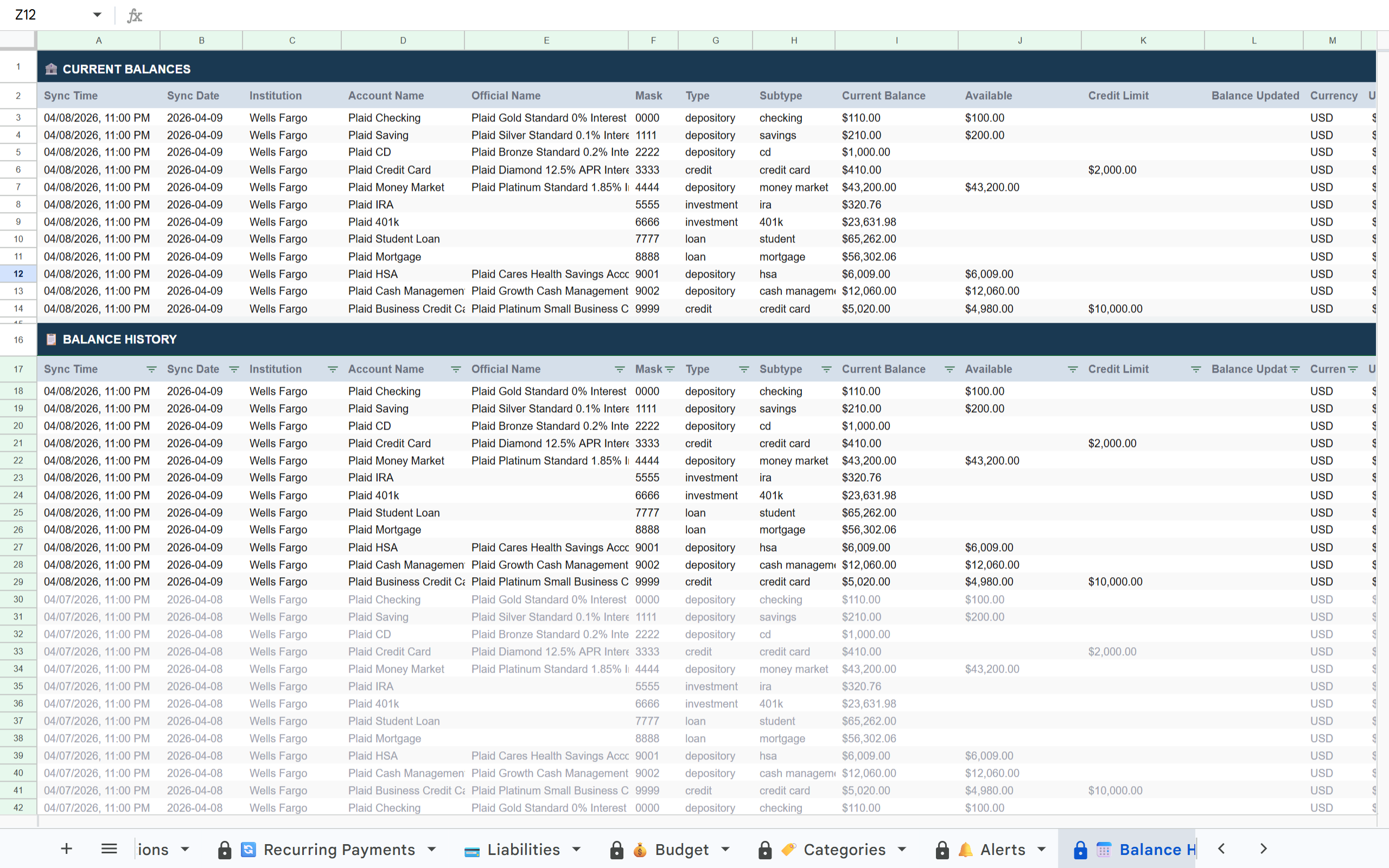
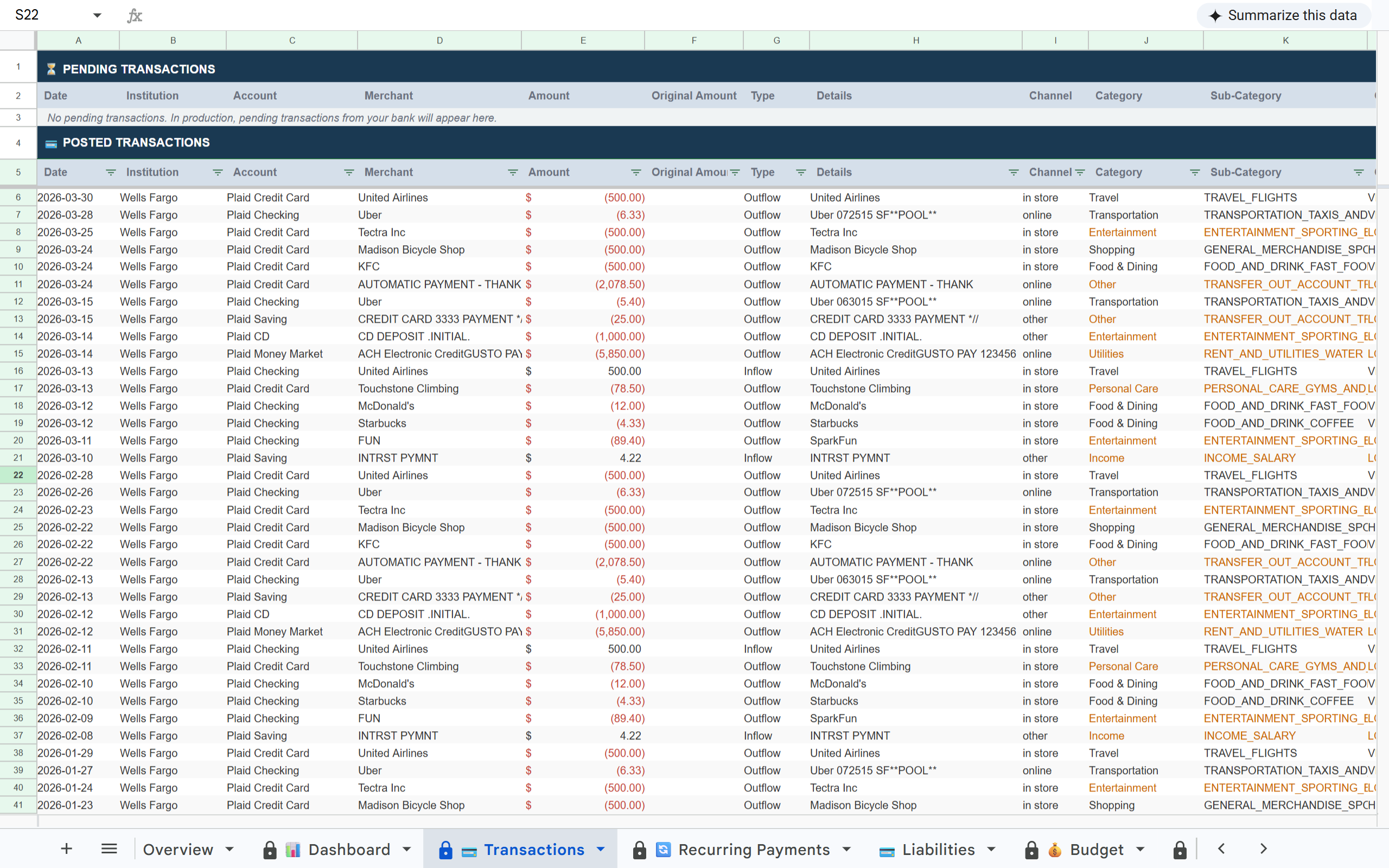
Chase transactions in Finsemble Transactions tab Chase account balances in Finsemble Dashboard Chase Balance History tab in Finsemble

How it works

1

Connect your Chase accounts

Link Chase via Plaid. Checking, savings, and credit cards all connect in one flow. Read-only access: Finsemble can never move money or modify your accounts.

2

Every Chase account lands in one sheet

Finsemble creates a structured Google Sheet in your Drive. All Chase accounts appear in the Dashboard Account Balances section. All transactions land in the Transactions tab, already categorised.

3

Daily sync keeps it current

Every day Finsemble checks Chase for new transactions and updated balances and writes them to your sheet. You open the sheet and it is already up to date.

Why CSV exports and Zapier automations eventually break

Finsemble is a maintained, production Plaid integration. The connection stays current. Deduplication is built in. New accounts sync automatically when you add them to your sheet.

What's in your sheet

📊 Dashboard 💳 Transactions 🔄 Recurring Payments 💳 Liabilities 💰 Budget 🏷️ Categories 🔔 Alerts 📅 Balance History 💼 Holdings 📊 Inv. Transactions 💰 Savings

Built on trust

🔒 Read-only access

Finsemble reads your transactions and balances. We never initiate transactions or move money.

🏦 Powered by Plaid

The same bank connection layer used by Venmo, Coinbase, and thousands of other financial apps. 12,000+ institutions.

📂 Your Google Drive

Your sheet is created in your own Google Drive. Not our servers. Even if you cancel Finsemble, your sheet and data remain yours permanently.

🔐 No credentials stored

We never see or store your Chase username or password. Plaid handles authentication using bank-grade security.

Every Chase export you skip is a month of data you lose.

The longer you wait to automate this, the bigger the catch-up project becomes. Finsemble removes the maintenance burden entirely: your sheet stays current whether you think about it or not.

Frequently asked questions

Yes. Checking, savings, credit cards, and investment accounts all connect through the same Plaid flow. All accounts appear in your sheet under a single Chase institution row in the Dashboard.
Yes, each credit card appears as a separate account. You can see transactions per card or consolidated across all Chase accounts. The Dashboard shows each account balance individually.
Plaid translates Chase's raw merchant codes into readable names and applies categories automatically, including Food and Dining, Transportation, Shopping, and 14 others. You can override any category directly in the sheet.
Yes. Connect them in the same sheet for a consolidated view, or create separate sheets (one for personal, one for business). Starter allows up to 3 institutions per sheet. Pro allows unlimited.
No. Your Chase credentials go directly to Plaid and never touch Finsemble's servers. Plaid uses bank-grade encryption and is the same connection layer used by Venmo, Coinbase, and thousands of other financial apps.

All your Chase accounts. One Google Sheet. Updated daily.

Connect Chase once and Finsemble keeps your sheet current automatically.

11-day Pro trial · No credit card required