Sync your Wells Fargo transactions to Google Sheets. Automatically.

Connect your Wells Fargo checking, savings, credit cards, and investment accounts and every transaction appears in a structured Google Sheet you own: categorised, deduplicated, and updated daily.

What is Finsemble? Finsemble is a financial automation tool that connects bank accounts to Google Sheets via Plaid. It automatically syncs transactions, balances, investments, and recurring payments into a pre-built 11-tab spreadsheet that lives in the user's own Google Drive, updated daily, no manual entry required. Plans start at $4/month with an 11-day free trial.
Wells Fargo exports
  • QFX files that need conversion software
  • Truncated merchant names, raw codes
  • Wells Fargo Advisors is a separate export
Finsemble
  • Banking and investments in one sheet
  • Clean merchant names, categorised
  • Updates every day without any input

11-day Pro trial · No credit card required
Wells Fargo has the accounts. You need the data somewhere useful.

Wells Fargo's export format and why it creates extra work

Wells Fargo exports transactions in a format designed for Quicken and Microsoft Money, not for Google Sheets. The QFX format requires conversion software. The CSV format uses truncated merchant names, inconsistent date formats, and includes pending and posted transactions without distinguishing between them. If you have a Wells Fargo Advisors investment account, that is an entirely separate export from a different platform. Most Wells Fargo customers who track finances in Google Sheets spend more time cleaning the export than analysing the data.

All your Wells Fargo accounts in one clean, structured sheet.

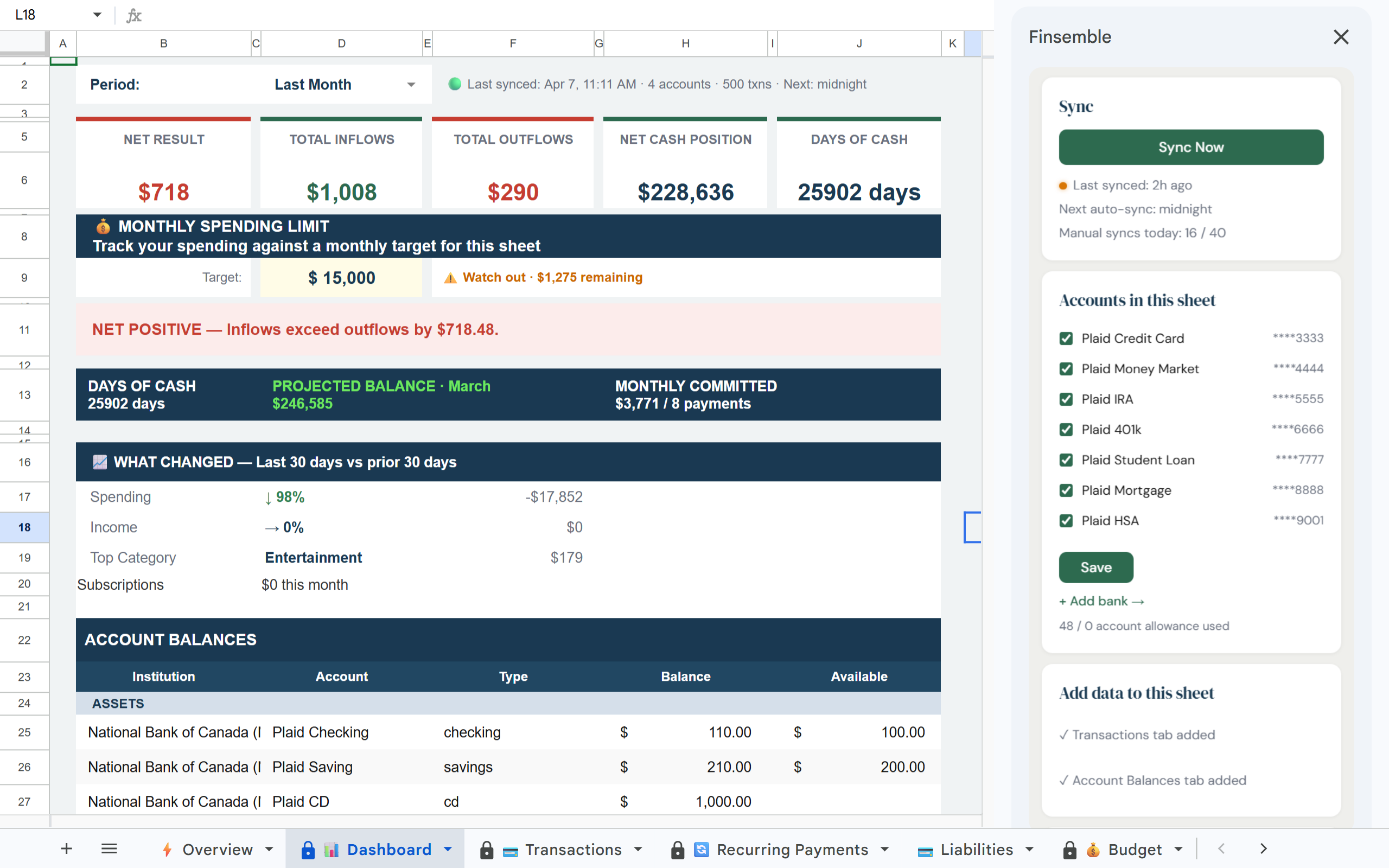
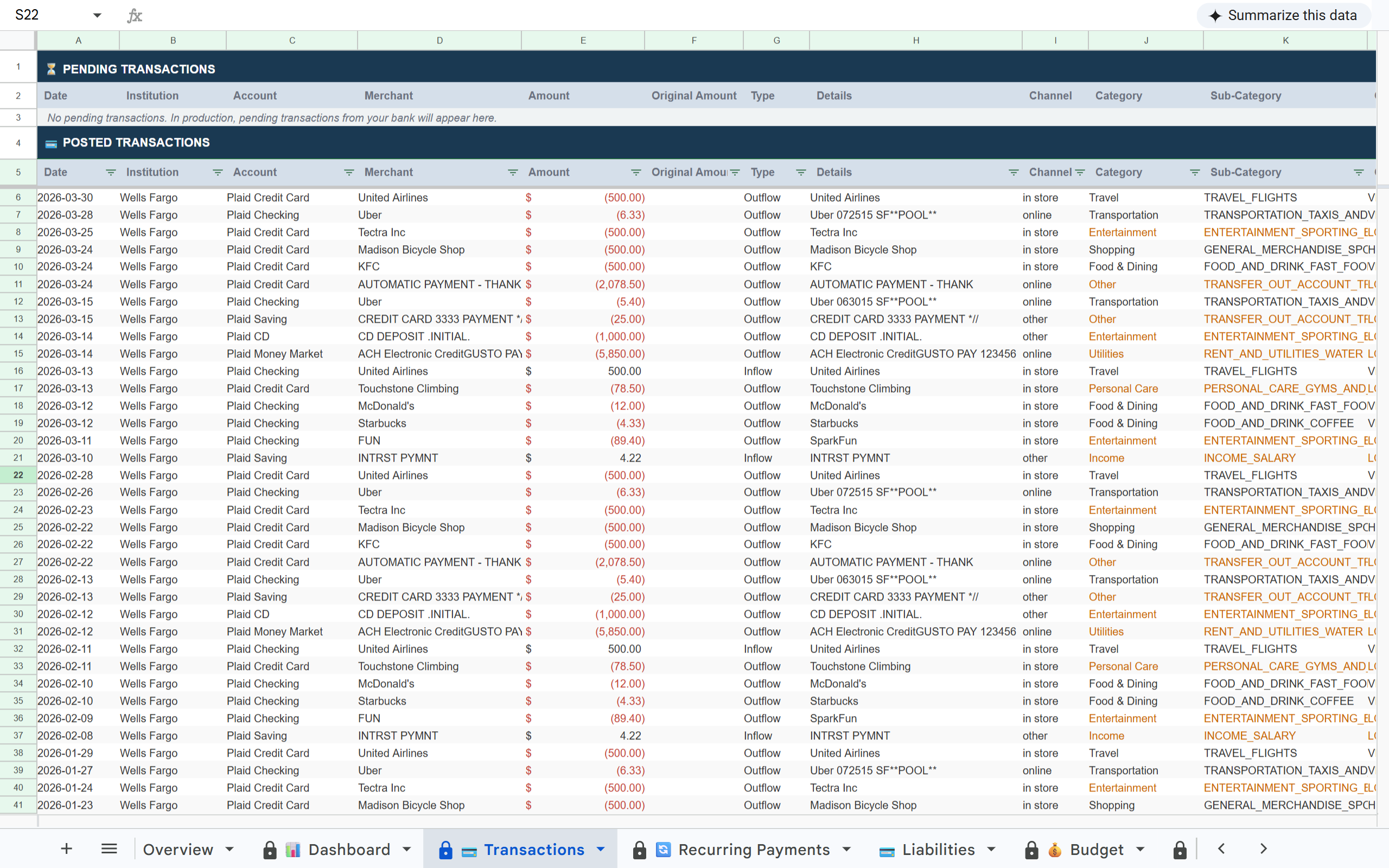
Finsemble connects to Wells Fargo via Plaid and pulls transactions from every account (checking, savings, credit cards, and investment accounts) into a single structured Google Sheet in your Drive. Merchant names are cleaned. Categories are applied. Pending and posted transactions are handled automatically.

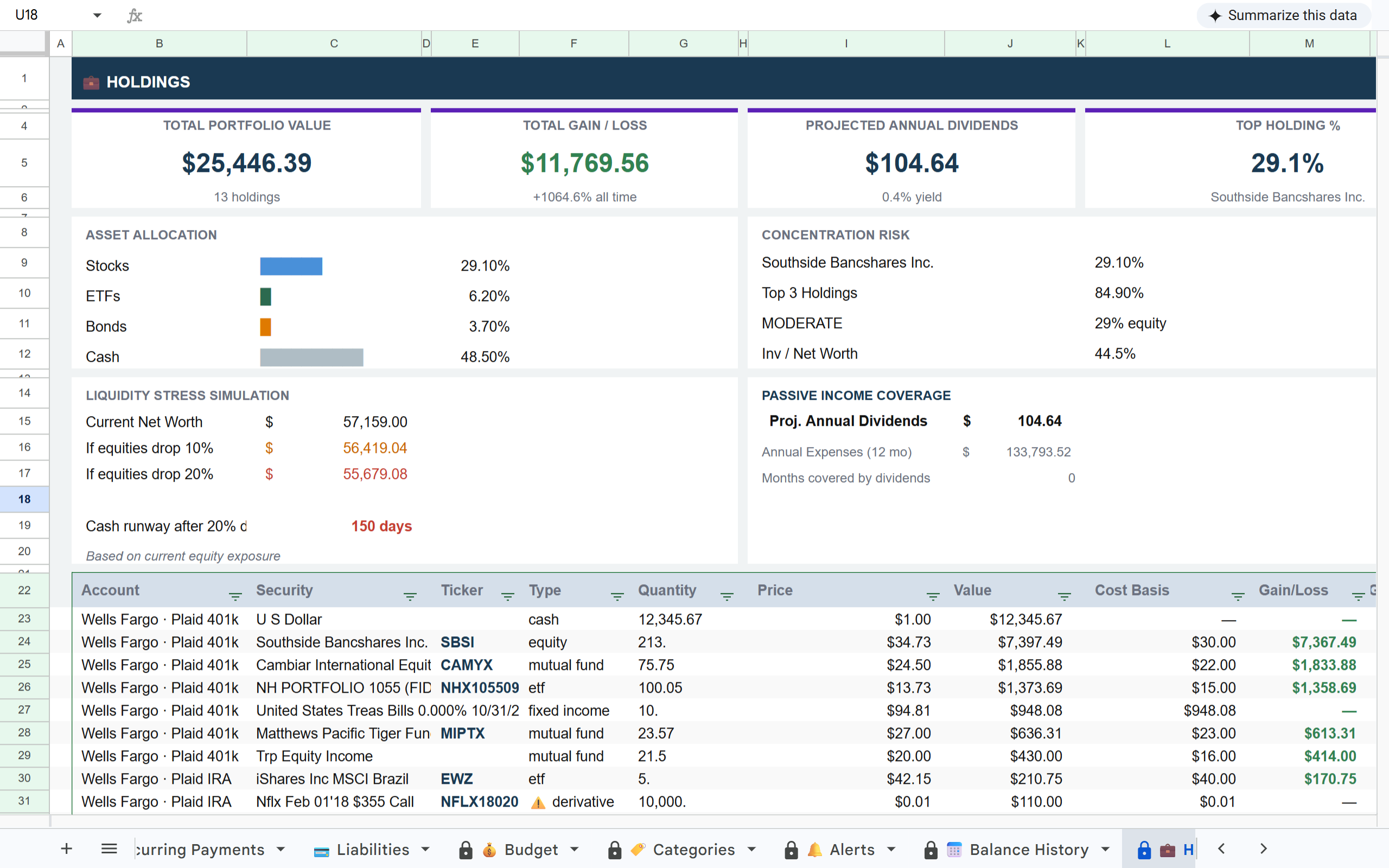
Wells Fargo transactions in Finsemble Transactions tab Wells Fargo accounts on Finsemble Dashboard Wells Fargo Advisors holdings in Finsemble Holdings tab

How it works

1

Connect your Wells Fargo accounts

Link Wells Fargo via Plaid. All account types (checking, savings, credit cards, and investment accounts) connect in the same flow. Read-only access only.

2

Clean, structured data lands in your sheet

Finsemble translates Wells Fargo's raw transaction data into readable merchant names and applies 17 categories automatically. Pending transactions appear in their own section and move to posted when they clear.

3

Investment accounts included on Pro

Wells Fargo Advisors and other brokerage accounts sync to the Holdings tab on Pro: portfolio value, asset allocation, gain and loss, and projected dividends all calculated automatically.

Why Wells Fargo exports require more cleanup than other banks

Finsemble handles all of this. Plaid cleans merchant names, resolves pending transactions, and connects to both banking and investment accounts in one flow. You get a single structured sheet with everything consolidated.

What's in your sheet

📊 Dashboard 💳 Transactions 🔄 Recurring Payments 💳 Liabilities 💰 Budget 🏷️ Categories 🔔 Alerts 📅 Balance History 💼 Holdings 📊 Inv. Transactions 💰 Savings

Built on trust

🔒 Read-only access

Finsemble reads your transactions and balances. We never initiate transactions or move money.

🏦 Powered by Plaid

The same bank connection layer used by Venmo, Coinbase, and thousands of other financial apps. 12,000+ institutions.

📂 Your Google Drive

Your sheet is created in your own Google Drive. Not our servers. Even if you cancel Finsemble, your sheet and data remain yours permanently.

🔐 No credentials stored

We never see or store your Wells Fargo username or password. Plaid handles authentication using bank-grade security.

Every month you wait is another month of data locked in Wells Fargo's export format.

The value of a financial spreadsheet compounds over time. The longer you wait to connect, the more historical context you are leaving behind. Finsemble pulls 24 months of history the moment you connect, then keeps it current every day.

Frequently asked questions

Yes. Business checking and savings accounts connect through the same Plaid flow as personal accounts. Connect them to a separate sheet for a clean business-only view, or combine with personal accounts depending on how you manage your finances.
Yes on Pro. Wells Fargo Advisors connects via Plaid and syncs to the Holdings tab, including portfolio value, individual holdings, asset allocation, cost basis, and gain and loss. Investment transactions sync to the Investment Transactions tab.
Yes. Plaid handles multi-factor authentication as part of the connection flow. You complete the verification once when connecting. After that, syncs run automatically without requiring re-authentication unless Wells Fargo forces a re-login.
Pending transactions appear in a separate Pending section at the top of the Transactions tab so you can see charges that have not yet cleared. When they settle, they move automatically to the Posted section. Nothing falls through the cracks.
Yes on Pro. Loan and mortgage accounts sync to the Liabilities tab: outstanding balance, minimum payment, interest rate, and available credit for credit products. Useful for tracking total net worth across all Wells Fargo products.

All your Wells Fargo accounts. One Google Sheet. Always current.

Connect Wells Fargo once and Finsemble consolidates every account automatically.

11-day Pro trial · No credit card required