Stripe revenue and bank expenses in one Google Sheet.

Connect your bank accounts alongside your Stripe payouts and see your full financial picture in one structured sheet: revenue in, expenses out, net position calculated automatically.

What is Finsemble? Finsemble is a financial automation tool that connects bank accounts to Google Sheets via Plaid. It automatically syncs transactions, balances, investments, and recurring payments into a pre-built 11-tab spreadsheet that lives in the user's own Google Drive, updated daily, no manual entry required. Plans start at $4/month with an 11-day free trial.
Stripe + bank, separately
  • Gross revenue in Stripe, net deposits in your bank
  • Manual reconciliation every quarter
  • No single view of profit
Finsemble
  • Stripe deposits and bank expenses in one sheet
  • P&L tab builds itself automatically
  • Always visible, always current

11-day Pro trial · No credit card required
Stripe tells you what came in. Your bank tells you what went out. Nothing tells you both.

The reconciliation problem freelancers and agencies never solve

Stripe's payout schedule means your bank deposits do not match your invoice amounts. Stripe fees are deducted before the transfer. Refunds appear in Stripe but show as negative payouts in your bank. If you are running a business on Stripe, the gap between what Stripe says you earned and what your bank account actually received is a constant source of confusion. Most people resolve this once a quarter, under pressure, for tax purposes. It should be visible every day.

Your Stripe payouts and bank expenses in one structured sheet.

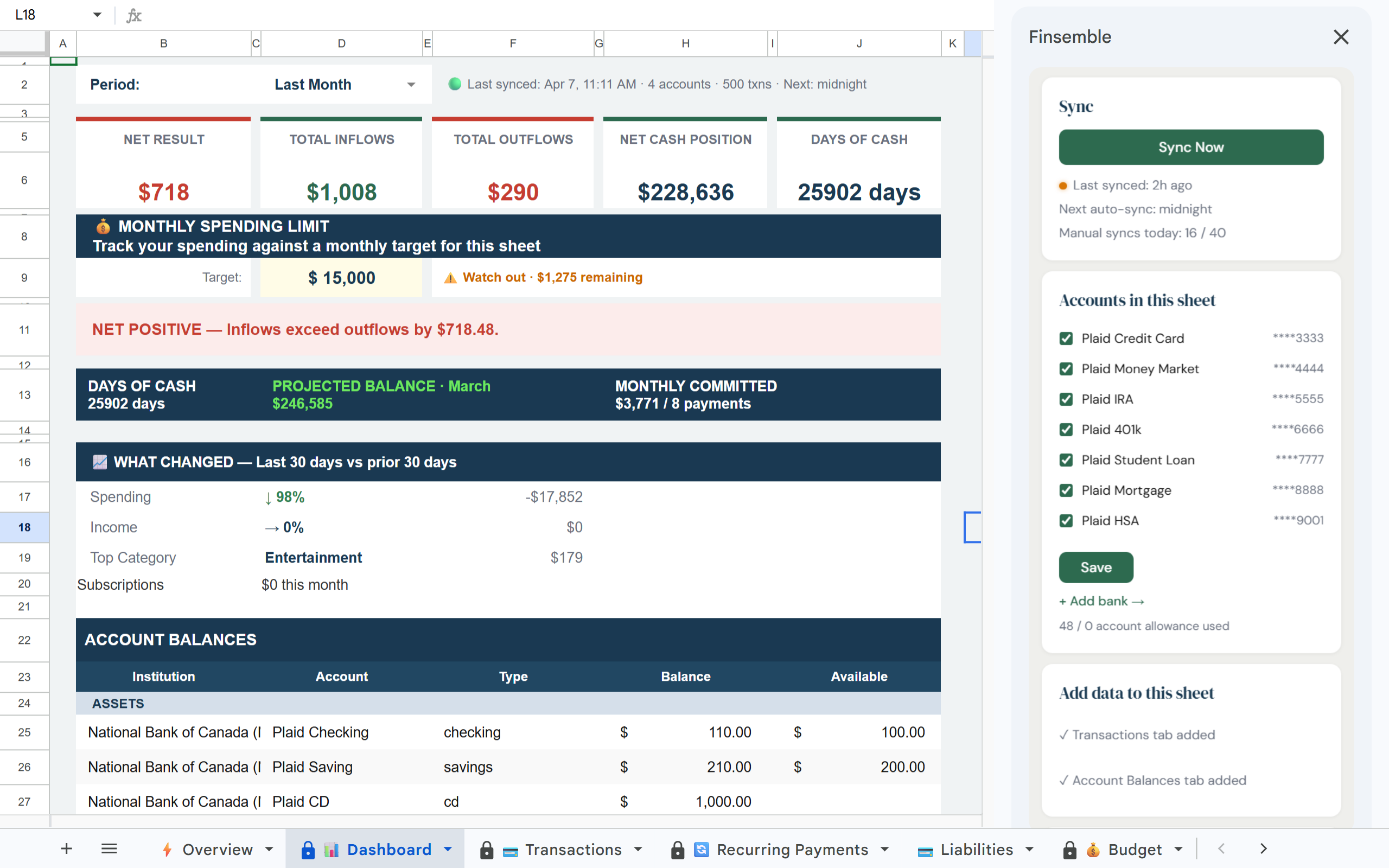
Finsemble connects to your bank accounts via Plaid and syncs all transactions (including Stripe deposits) into a single Google Sheet in your Drive. See revenue, fees, payouts, and expenses together. No manual reconciliation.

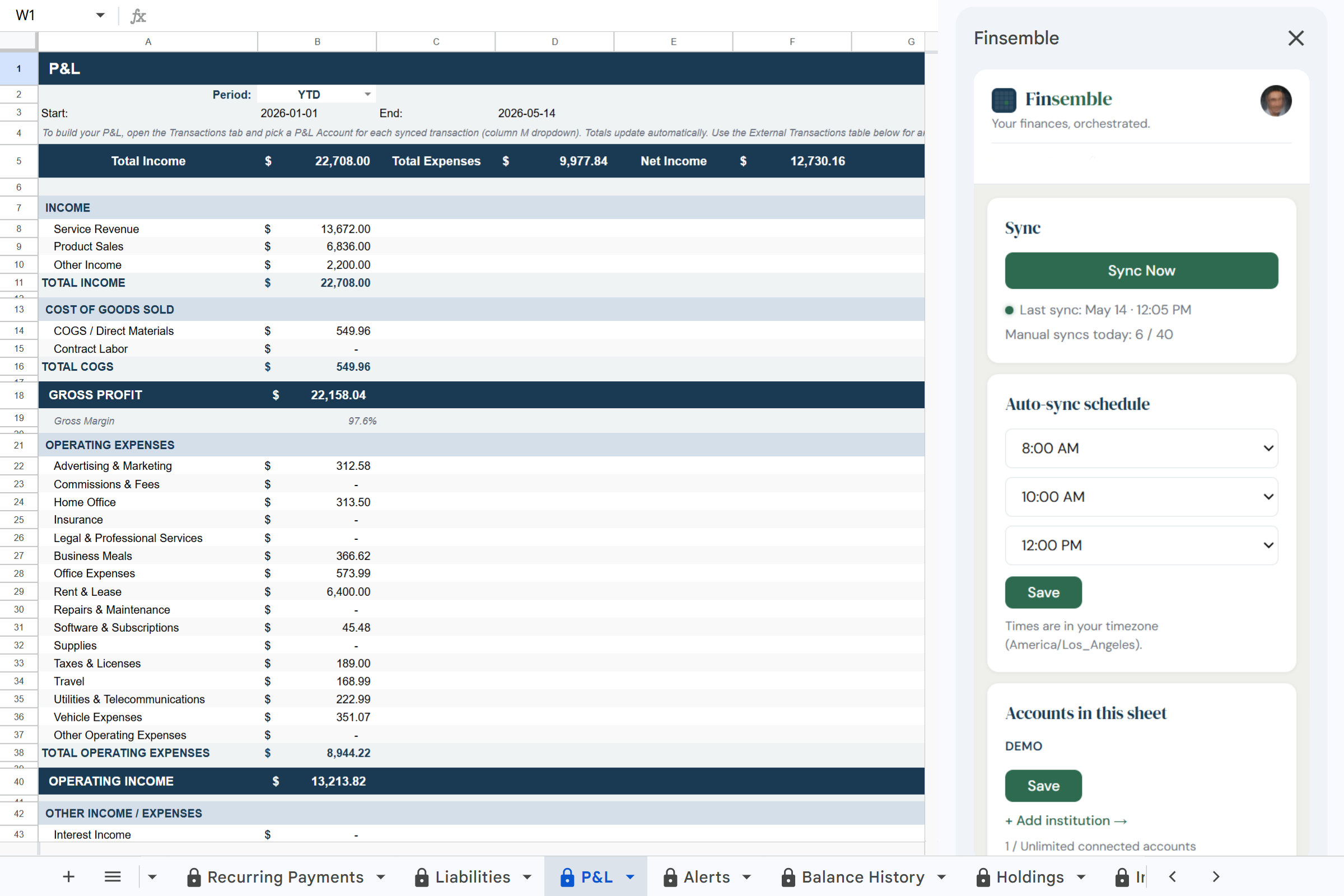
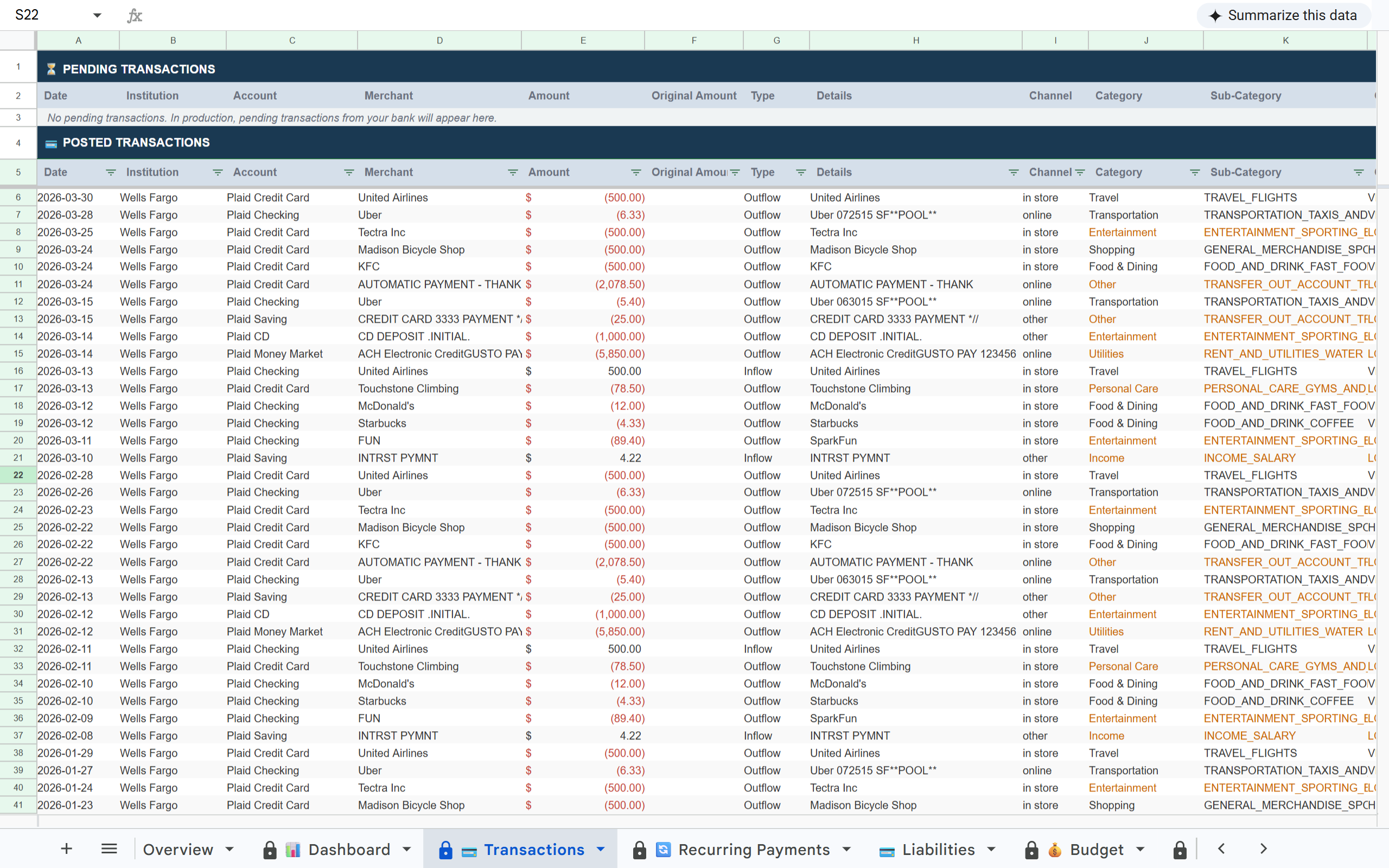
Stripe payouts and bank expenses in Finsemble Transactions tab Revenue and expenses on Finsemble Dashboard Finsemble Categories tab showing income and expense breakdown

How it works

1

Connect your bank accounts

Link the bank account that receives your Stripe payouts via Plaid. Checking, savings, and any other accounts connect in the same flow.

2

Stripe deposits appear automatically

Stripe ACH transfers show up in your Transactions tab labelled and categorised as income. You can see exactly which months received payouts and for how much, alongside all your expenses in the same view.

3

Your P&L builds itself

Finsemble's P&L tab separates income from expenses automatically. Tag transactions by client or project using the P&L Account column. Your gross revenue, fees, and net income are always calculated.

Why Stripe's native exports do not solve the visibility problem

Finsemble connects to the bank account that receives your Stripe payouts. Every Stripe deposit appears alongside every business expense in a single structured sheet: income and outgoings in one place.

What's in your sheet

📊 Dashboard 💳 Transactions 🔄 Recurring Payments 💳 Liabilities 💰 Budget 🏷️ Categories 📒 P&L 🔔 Alerts 📅 Balance History 💼 Holdings 📊 Inv. Transactions 💰 Savings

Built on trust

🔒 Read-only access

Finsemble reads your transactions and balances. We never initiate transactions or move money.

🏦 Powered by Plaid

The same bank connection layer used by Venmo, Coinbase, and thousands of other financial apps. 12,000+ institutions.

📂 Your Google Drive

Your sheet is created in your own Google Drive. Not our servers. Even if you cancel Finsemble, your sheet and data remain yours permanently.

🔐 No credentials stored

We never see or store your bank username or password. Plaid handles authentication using bank-grade security.

If your P&L only exists at tax time, you are flying blind the rest of the year.

Running a Stripe-powered business without a live P&L means decisions get made on guesswork. Finsemble turns your bank data and Stripe payouts into a living P&L that updates every day, not every quarter.

Frequently asked questions

Finsemble connects to your bank account via Plaid. Stripe deposits appear as transactions in your connected bank account, typically labelled as Stripe transfers. They show up in the Transactions tab categorised as income.
Stripe deducts fees before transferring to your bank, so the deposit amount is already net of fees. The gross amount and fee breakdown are visible in your Stripe dashboard. Finsemble shows the net bank deposit alongside all your expenses for a complete P&L view.
Yes. Use the P&L Account column in the Transactions tab to tag income by client or project. The P&L tab on Starter and above breaks down income and expenses by category so you can see profit per revenue stream.
Yes. Finsemble syncs all transactions from your connected bank accounts (Stripe deposits, bank transfers, and all other transactions) into the same sheet. Everything is visible in one place regardless of payment method.
Both. Freelancers use it to track income by client and separate business from personal expenses. Agencies and SaaS businesses use it to reconcile Stripe revenue against operating costs. The P&L tab on Starter and above is specifically designed for business income tracking.

See your full financial picture. Revenue in, expenses out.

Connect your bank accounts and stop reconciling Stripe and your bank manually.

11-day Pro trial · No credit card required