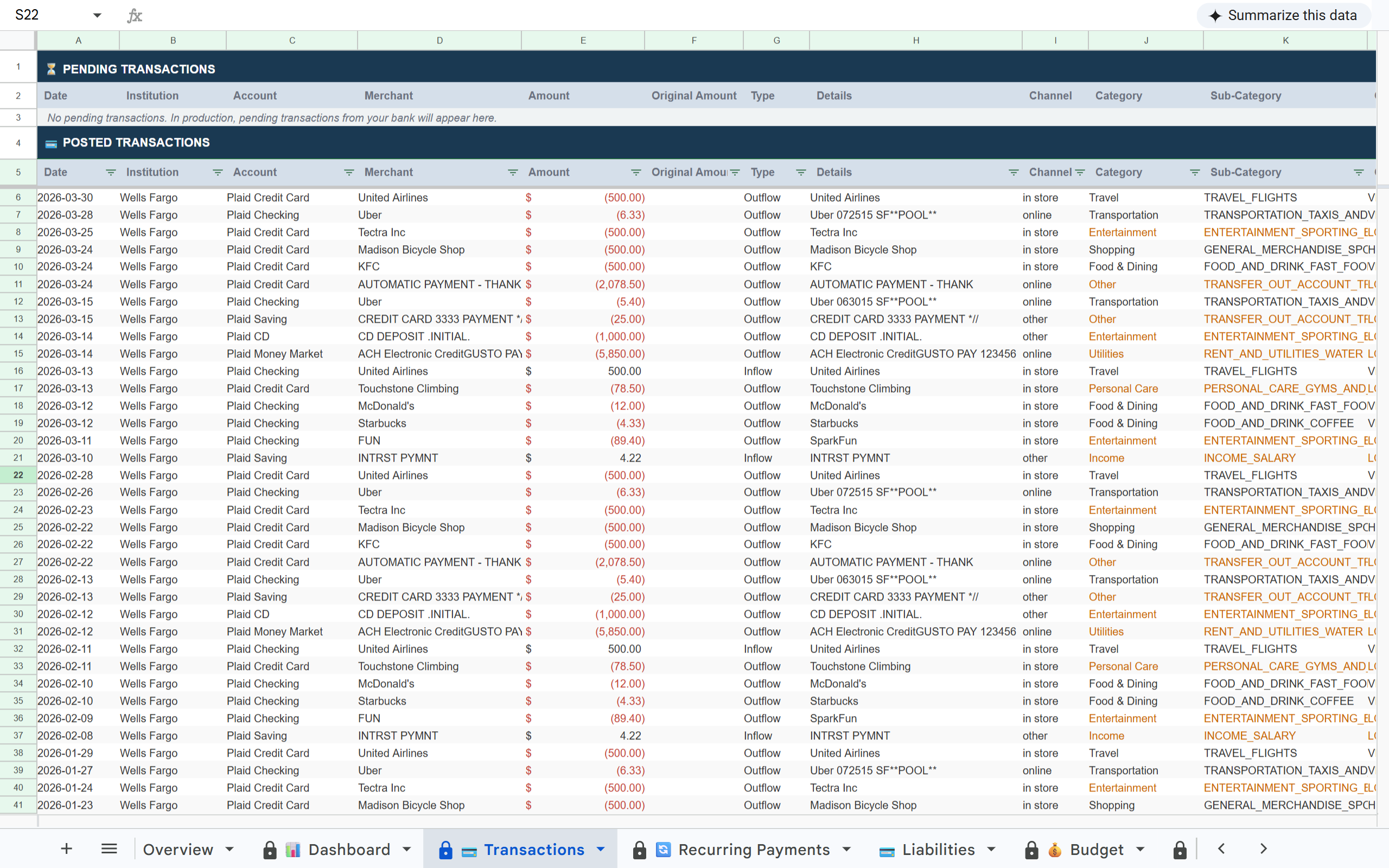
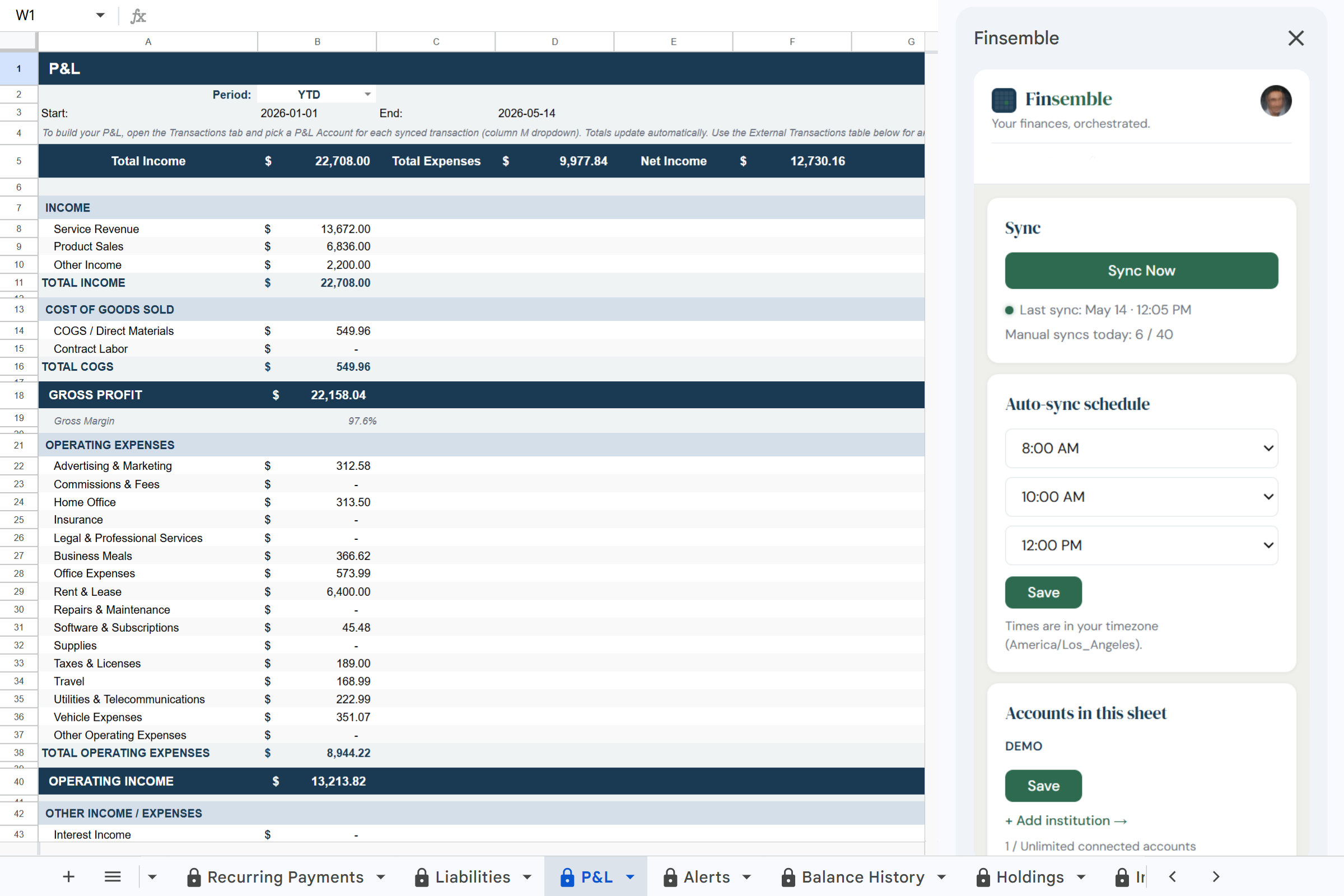
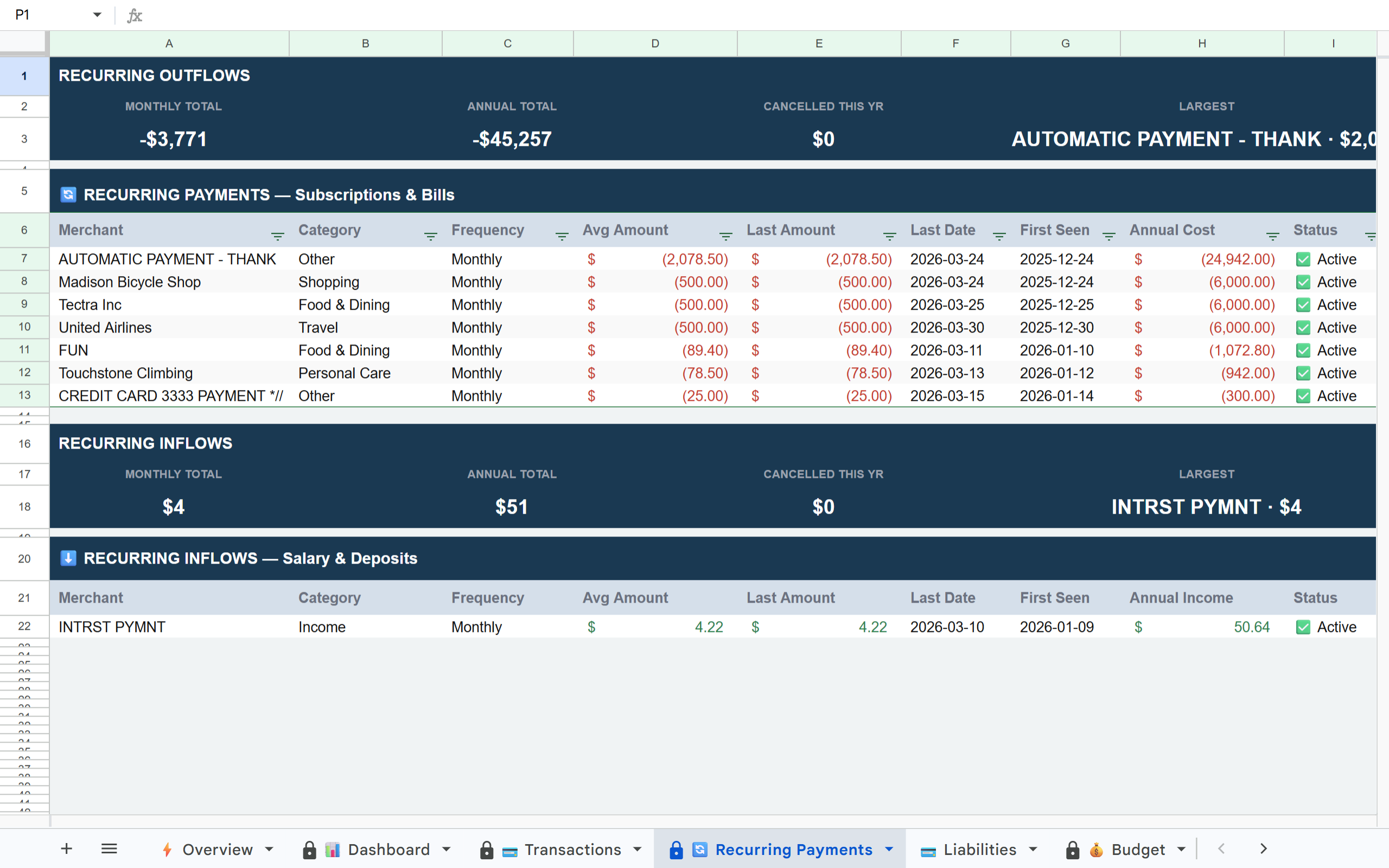
Connect your bank accounts and the data-entry half of bookkeeping stops being your job. Every transaction lands in Google Sheets already categorized, business separated from personal, with a P&L that recalculates as the month goes. Nothing to import, nothing to catch up on.
Takes about 2 minutes · Read-only access · Your data stays in your Google Drive
🏦 Powered by Plaid🔒 Read-only bank access📂 Your sheet lives in your Google Drive
Doing the books only when you cannot put it off any longer?
✗ The transactions are in your bank and the books are in a spreadsheet, and the only thing connecting them is you, on a Sunday, with a CSV export and 20 minutes of cleanup.
✗ Business and personal expenses are in the same account. Every month you go through and manually tag which is which before anything makes sense.
✗ Tax season means reconstructing a year in a weekend. Guessed categories, missing months, and a spreadsheet your accountant has to clean up before they can start.
Why freelancers keep coming back to Google Sheets even after trying everything else
Freelance bookkeeping is different from personal budgeting and different again from company accounting. There is no bookkeeper, no month-end close, and no one else who will notice if a quarter goes unrecorded. The work is small, constant, and entirely yours.
Budgeting apps are built for consumers. Accounting software is built for companies with accounting teams. Neither is built for a freelancer who runs their business alone.
Google Sheets is where most freelancers end up. The part that defeats people is not the spreadsheet, it is keeping it fed. Finsemble is the feed: your bank writes the rows, you decide what they mean, and the books are current without a bookkeeping session.
Your bank writes the rows. You just decide what they mean.
Connect your business and personal accounts and Finsemble keeps the sheet fed every day: transactions categorized on arrival, expenses grouped, and a P&L that recalculates itself. Finsemble is not an accounting system and does not keep a ledger for you. It does the part that makes bookkeeping tedious, which is getting accurate, categorized data in without typing it.
1 / 3·Transactions
How it works
1
Connect your accounts
Link your business checking, personal accounts, and any credit cards via Plaid. Finsemble handles the connection and keeps it current.
2
Decide what each transaction is
Use the P&L Account column in the Transactions tab to assign income and expenses to a category, a client, or an individual job or contract, so you can see how each piece of work actually did. The P&L tab aggregates it automatically. No formulas to write.
3
Business and personal stay separated
Create separate sheets for business and personal finances, or run them together and use tags to distinguish them. Either way, Finsemble syncs both automatically. Connections occasionally need to be refreshed depending on your bank. When that happens, you will see a reconnect prompt. No data is lost.
4
Hand it to your accountant
The sheet is in your Google Drive. Share it the way you share any Google file. They get categorized transactions and a P&L in a format they already work in, instead of a folder of exports to reconstruct.
What you will notice first
After your first sync, three things tend to stand out immediately:
The backlog is gone. Everything from the last two years is already in and categorized, without a single import.
Business vs. personal separation becomes obvious once all transactions are in one view.
Your P&L is already calculating. Income, expenses and net update as transactions arrive, so the current quarter is a number you can look up rather than a job to do.
Why freelancers outgrow other finance tools quickly
Personal budgeting apps: Built for household spending, not for a business. No P&L, no business and personal separation, nothing an accountant can use.
QuickBooks and Xero: Overkill for a solo operator. Expensive, complex, and still requires manual reconciliation. Your accountant ends up doing the same cleanup anyway.
CSV exports from your bank: Works once. After two months of skipped exports the backlog becomes a project you never finish.
Built on trust
🔒 Read-only access
Finsemble reads your transactions and balances. We never initiate transactions or move money.
🏦 Powered by Plaid
The same bank connection layer used by Venmo, Coinbase, and thousands of other financial apps. 12,000+ institutions in the US and Canada.
📂 Your Google Drive
Your sheet is created in your own Google Drive. Not our servers. Even if you cancel Finsemble, your sheet and data remain yours permanently.
🔐 No credentials stored
We never see or store your bank username or password. Plaid handles authentication using bank-grade security.
Frequently asked questions
Yes. The sheet lives in your Google Drive, so you share it the way you share any Google file. Your accountant gets every transaction already categorized and a P&L covering whatever period they ask for, which is a starting point they can work from rather than a pile of exports to sort out first.
Yes. You can connect all accounts to one sheet and use the P&L Account column to tag transactions as business or personal. Or create two separate sheets, one for business, one for personal, and assign accounts accordingly in the Finsemble app.
Yes. The P&L tab shows total income, expense categories, gross profit, and operating income for any time period you select. It is designed to give you and your accountant a clear view of your business finances without requiring any manual data entry.
Finsemble connects to bank accounts via Plaid. PayPal and Wise transfers that land in your connected bank will appear as deposits. For income that stays in PayPal or Wise, you can add it manually to the External Transactions section of the P&L tab.
Yes. Connect as many accounts as you need. Tag each transaction by client using the P&L Account column. The P&L tab will show you income and profit broken down by however you have tagged things.
Clean books. Every month. Without the manual work.
Connect your accounts and the bookkeeping stays current on its own, every day, without you.