Free Template

Personal finance dashboard for Google Sheets — free.

A complete personal finance dashboard in Google Sheets. KPIs, budget tracker, spending by category, net worth, and balance history — all in one sheet. Download free and use manually, or connect your bank accounts and it updates itself automatically every day.

Free template
  • Enter transactions manually
  • Update when you remember
  • Free forever, always yours
With Finsemble
  • Bank accounts feed it automatically
  • Updates every day without input
  • Same sheet, zero manual work

Your spreadsheet lives in your Google Drive, where you control it.

Personal Finance Dashboard

Google Sheets template. Free forever. No signup required. KPIs, transactions, budget, categories, balance history, and net worth — all included.

Download free →

No email required. Just a Google account to copy the sheet.

A dashboard only works when the data is current.

A personal finance dashboard that shows your real numbers.

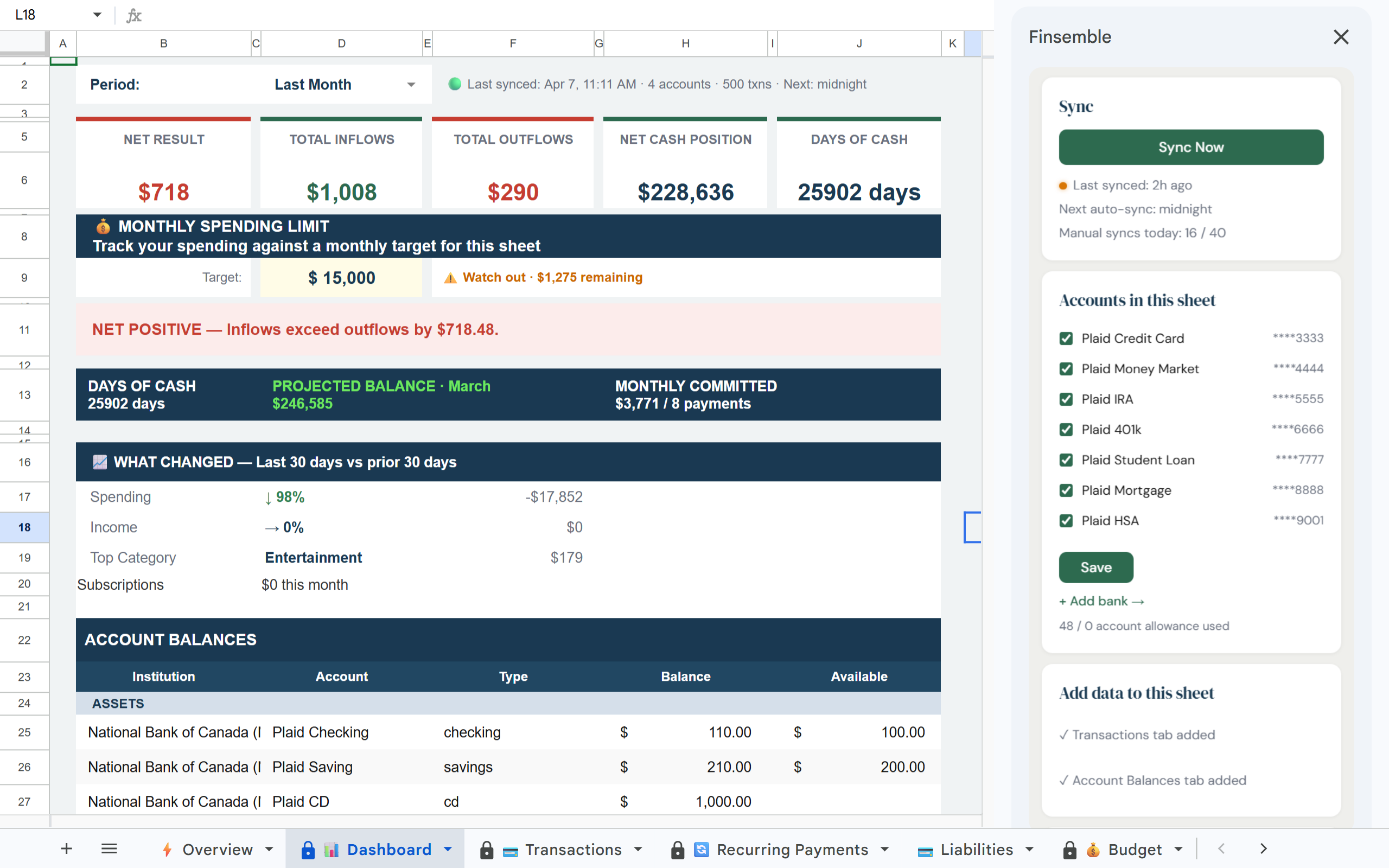
The template includes every tab you need — Dashboard with live KPIs, Transactions by account, Budget vs actual across 17 categories, Categories breakdown, Balance History, Alerts, and Savings goals. Use it manually for free, or connect your bank accounts and it runs itself.

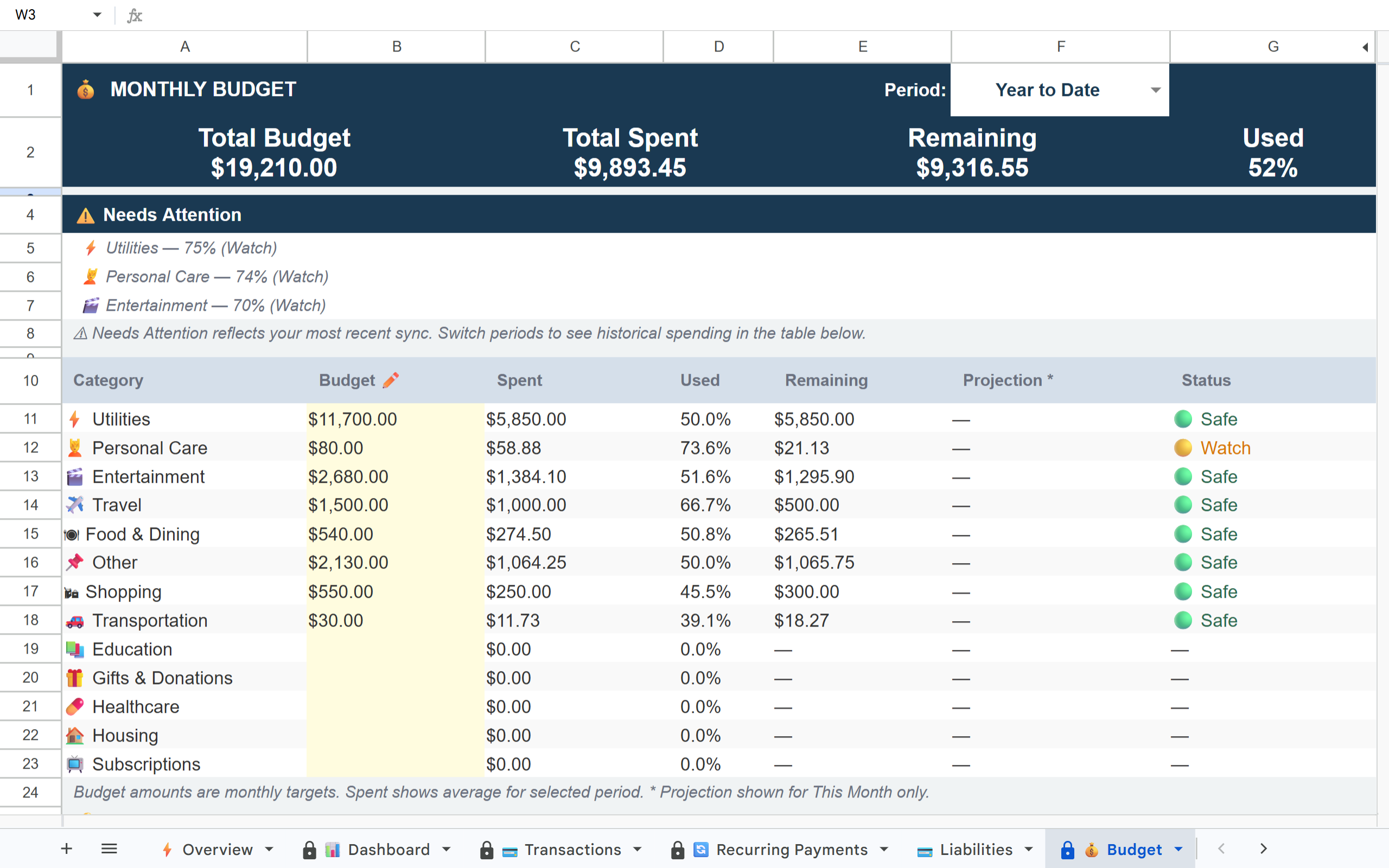
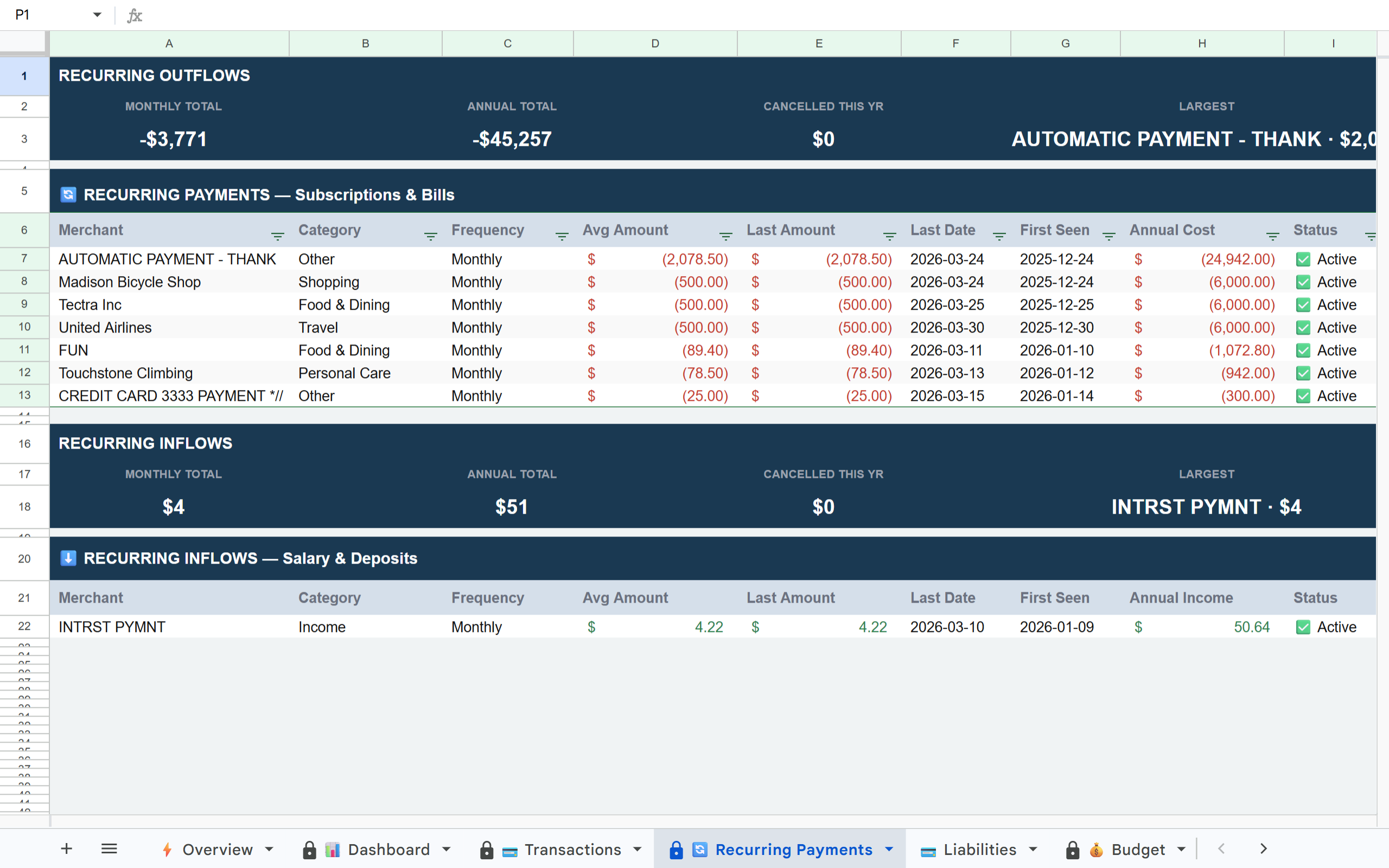
Finsemble Dashboard showing net worth, monthly spending, savings rate and budget KPIs Finsemble Budget tab showing actual vs budgeted spending across categories Finsemble Categories tab showing spending breakdown by category over time

Most people overestimate their savings rate by 15-20% because they're working from memory. Finsemble's Budget tab shows actual vs. budgeted spending across 17 categories — automatically.

This template updates itself when connected to your bank accounts.

The version you downloaded works manually — enter your transactions and it runs on your input. The Finsemble version is identical in structure, but your bank accounts feed it automatically. Every transaction appears as it happens.

Free template (manual)
  • Enter transactions yourself
  • Update balances manually
  • Works when you update it
  • Free forever
With Finsemble (live)
  • Bank accounts feed it automatically
  • Balances update every day
  • Always current, zero effort
  • From $4/month
Connect your accounts and make it live →

How to make your template automatic

01
Connect your accounts

Link your bank accounts securely via Plaid — the same connection layer used by Venmo, Coinbase, and thousands of financial apps. Read-only access. Your credentials are never stored by Finsemble.

02
Your sheet is created and populated

Finsemble creates the complete template in your Google Drive — with your real transactions already in it. Full history on day one. KPIs calculated from your actual data. Nothing to enter manually.

03
It stays current automatically

New transactions appear daily. Budget vs actual updates automatically. Your KPIs reflect your real financial position — not last month's data you entered when you had time.

What's included in the template

All tabs, pre-built

📊 Dashboard — KPIs: Net Worth, Monthly Income, Spending, Savings Rate, Budget Variance
💳 Transactions — all accounts, all categories, sortable
📈 Budget — 17 categories, actual vs budgeted, monthly view
🏷️ Categories — spending by category over time
📉 Balance History — account balances over time
💰 Savings — savings goal tracking
🔔 Alerts — custom threshold notifications

Your data stays in your Drive

🔒
Read-only access

Finsemble can never move money or modify your accounts. Read-only transaction data only — the same standard Plaid enforces across all its connected apps.

🏦
Powered by Plaid

The same bank connection layer used by Venmo, Coinbase, and 8,000+ financial apps. Trusted by millions of users across thousands of institutions.

📂
Your Drive, your sheet

Your sheet lives in your Google Drive, where you control it permanently. Cancel Finsemble anytime and every row of data stays yours forever. No export needed.

🚫
No credentials stored

Your bank login credentials are never stored by Finsemble. Plaid handles authentication and passes only transaction data. Your bank never sees Finsemble.

Start with the free template. Upgrade when manual entry stops being worth your time.

Download the template and use it manually for free, forever. When entering transactions becomes the thing you put off every week, connect your accounts and Finsemble handles it permanently. No pressure, no expiry — the free template is genuinely free.

Free template, no signup 11-day Pro trial when you're ready Your sheet stays in your Drive forever

Frequently asked questions

Is the template really free with no signup?
Yes. Click the download button and you get a copy in Google Sheets immediately. No email, no account, no credit card. Use it manually forever.
What's the difference between the free template and Finsemble?
The template is static — you enter transactions manually. Finsemble connects to your bank accounts and fills the same template structure with your real transactions automatically. Same layout, same formulas — the only difference is whether data comes in manually or automatically.
Can I customise the template?
Yes, completely. It's a Google Sheet you own. Add columns, rename categories, build new tabs, write your own formulas. Finsemble writes to specific columns only — everything else is yours to modify.
What if I already have my own budget spreadsheet?
Finsemble creates a new sheet — it won't modify your existing files. If you want to pull data from Finsemble into your current sheet, use Google Sheets' IMPORTRANGE function.
What does Finsemble cost if I want to make it automatic?
Plans start at $4/month. There's also a free tier. All paid plans include an 11-day full Pro trial — no credit card required to start.

Start with the free template. Make it live when you're ready.

Download the personal finance dashboard now and use it manually for free. Connect your bank accounts when manual entry stops being worth your time — and Finsemble handles everything from that point forward.

Free during beta. No credit card required. Curious about plans? See pricing →