Clean client financial data. In Google Sheets. No CSV cleanup required.

Finsemble connects your clients' bank accounts directly to a Google Sheet in their Drive. You get shared access to structured, current transaction data, without chasing exports, cleaning files, or waiting for someone to remember to send something.

Takes about 2 minutes for clients to set up · Read-only bank access · Client data stays in their Google Drive

🏦 Powered by Plaid 🔒 Read-only bank access 📂 Client sheets stay in their Drive

Still receiving CSV files from clients who exported the wrong date range?

The accountant multiplier: one Finsemble connection, current data every day

For most clients, Finsemble removes 30 to 60 minutes of cleanup and reconciliation each month. Across 10 clients, that is a full workday recovered, spent on analysis and advice rather than data preparation.

When you recommend Finsemble to a client, they connect their accounts once. You get shared access to a clean, structured Google Sheet that updates automatically every day.

No more CSV requests. No more "can you resend that with the right date range." No more cleaning raw bank exports before you can work with them.

The sheet lives in the client's Google Drive. They own it. You have the access level they grant you, view, comment, or edit, the same way you share any Google file. If the client ever leaves Finsemble, their data stays in their Drive permanently.

For accounting firms recommending Finsemble to clients: contact us at finsemble@calisgroup.com to discuss firm pricing.
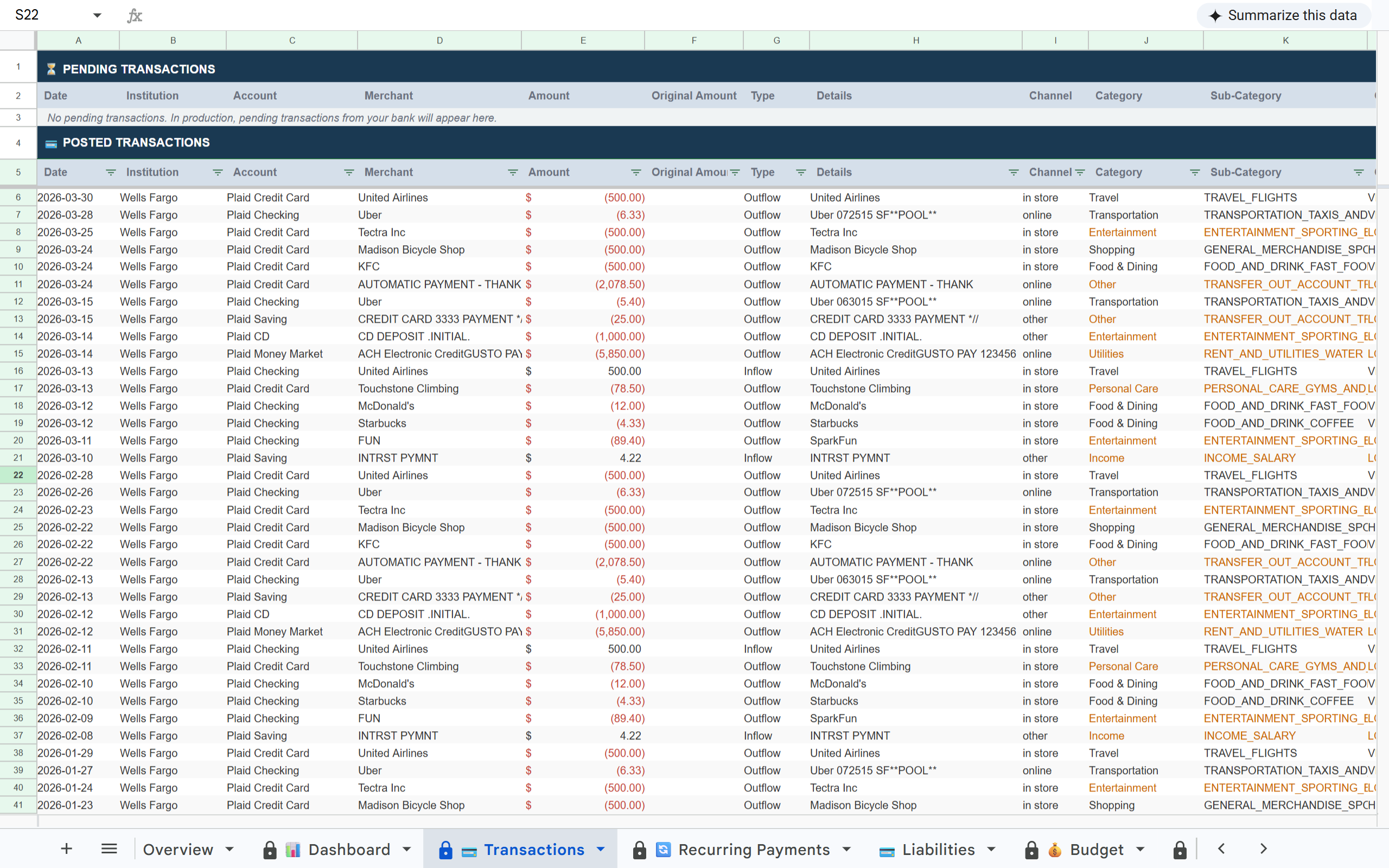
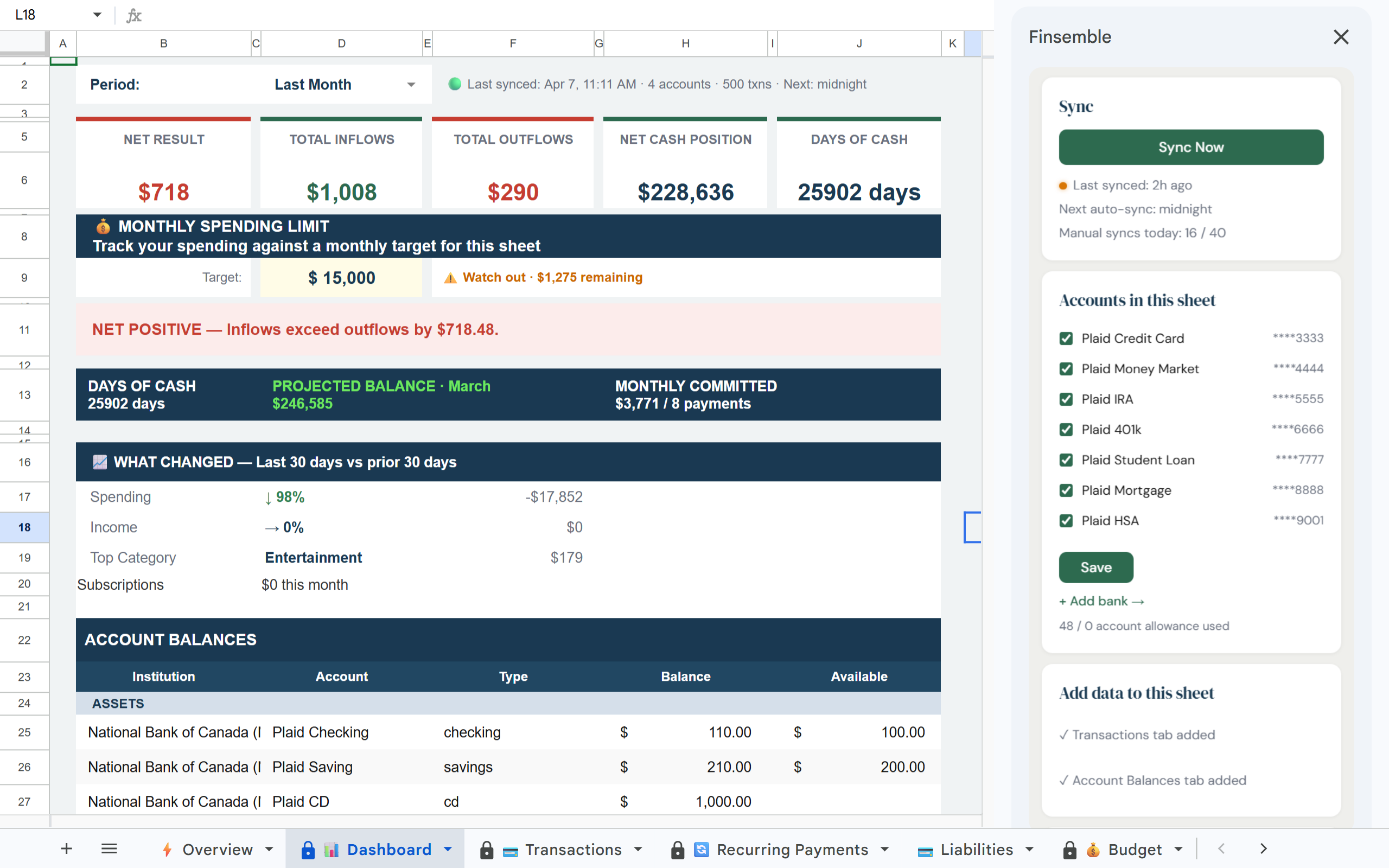
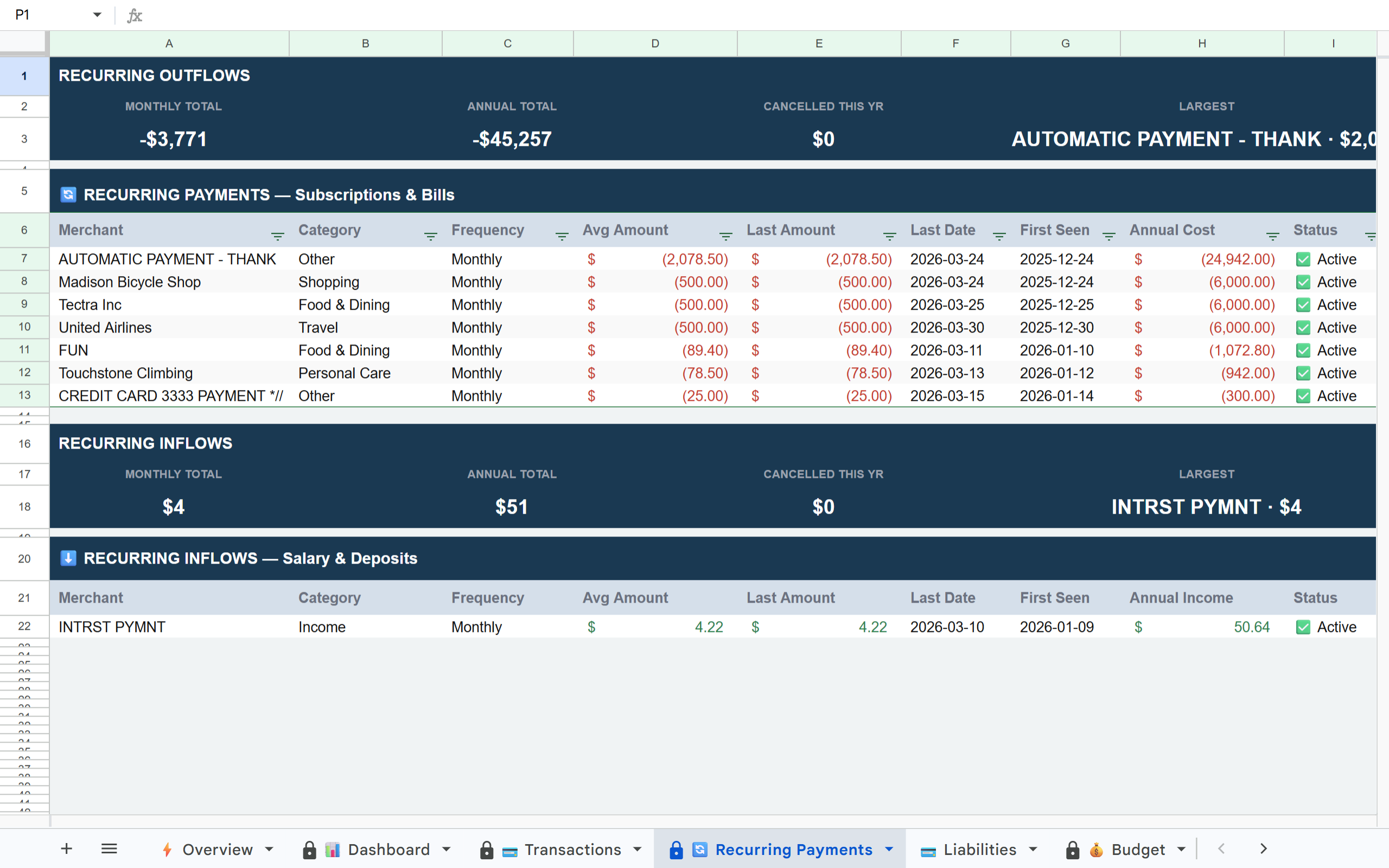
Structured client data. In Google Sheets. Updated automatically.

Your client connects their accounts once. A structured Google Sheet lands in their Drive and syncs daily. You get shared access to clean, current data in a format you already work in.

Finsemble Transactions tab in Google Sheets Finsemble Dashboard tab in Google Sheets Finsemble Recurring Payments tab in Google Sheets

How it works

1

Client connects their accounts

The client connects their bank accounts, credit cards, and investment accounts via Plaid. Takes about 2 minutes. You do not need to be involved in this step.

2

Finsemble builds the sheet in the client's Drive

A structured Google Sheet is created automatically with transactions, recurring payments, budget, P&L, balance history, and more, all pre-built and labeled.

3

Client shares the sheet with you

The client shares the Google Sheet using standard Google Drive sharing. You get a link. No Finsemble account required on your end to view the data. Connections occasionally need to be refreshed depending on the client's bank. When that happens, the client sees a reconnect prompt and data resumes automatically. No data is lost and you do not need to be involved.

4

Data stays current without either of you doing anything

Finsemble syncs new transactions automatically every day. The sheet you access always has current data. No monthly export requests, no catch-up sessions.

What you will notice first

When you open a client's shared sheet for the first time:

What's in the client sheet

📊 Dashboard 💳 Transactions 💰 Budget 🔄 Recurring Payments 💳 Liabilities 📈 P&L 🔔 Alerts 📅 Balance History 💼 Holdings 📊 Inv. Transactions 💰 Savings 📋 Overview

Why the current client data workflow breaks down every month

Built on trust

🔒 Read-only access

Finsemble reads transactions and balances. We never initiate transactions or move money.

🏦 Powered by Plaid

The same bank connection layer used by Venmo, Coinbase, and thousands of other financial apps. 12,000+ institutions in the US and Canada.

📂 Client's Google Drive

The sheet is created in the client's own Google Drive. Not our servers. Even if the client cancels Finsemble, their sheet and data remain theirs permanently.

🔐 No credentials stored

We never see or store bank usernames or passwords. Plaid handles authentication using bank-grade security.

Frequently asked questions

No. The sheet lives in the client's Google Drive. They share it with you via standard Google Drive sharing. You access it the same way you access any shared Google file. No Finsemble account required.
Yes. We offer discounted Pro access for accounting firms recommending Finsemble to clients. Contact finsemble@calisgroup.com to discuss firm pricing.
Finsemble works alongside QuickBooks, not instead of it. The client uses QuickBooks for formal accounting. Finsemble gives you and the client a live, flexible view of their finances in Google Sheets, useful for cash flow analysis, planning, and operational visibility that QuickBooks is not built for.
Finsemble syncs automatically every day. Pro users can also trigger manual syncs anytime. The sheet timestamp in the Dashboard shows the last sync time so you always know how current the data is.
Yes. Finsemble uses Plaid for bank connections, which uses read-only access only. No bank credentials are stored by Finsemble. Client transaction data syncs directly to the client's Google Drive. Finsemble does not retain or store it on our servers.

Structured client data in Google Sheets. Without asking for it every month.

Recommend Finsemble to your clients and get shared access to clean, current financial sheets.

Takes about 2 minutes for clients to set up · Read-only bank access · Client data stays in their Google Drive