Your personal finances. One Google Sheet. Always current.

Connect your bank accounts, credit cards, and investment accounts once. Finsemble builds a structured Google Sheet in your own Drive and keeps it updated automatically. Every transaction, every account, every day.

Takes about 2 minutes · Read-only access · Your data stays in your Google Drive

🏦 Powered by Plaid 🔒 Read-only bank access 📂 Your sheet lives in your Google Drive

Still updating your budget spreadsheet by hand every month?

Why budgeting apps never stick, and Sheets always does

Budgeting apps pull you into their interface. You log in, click around, and then close the tab. The data is theirs, not yours.

Google Sheets is different. You already know how it works. You can add your own formulas, share it with your partner, highlight rows, and build on top of it however you want. The problem was never the sheet. The problem was keeping it updated.

Finsemble solves exactly that. Your bank data flows automatically into a Sheet that lives in your Google Drive. You own it permanently. If you cancel tomorrow, every transaction, every tab, every formula stays in your Drive exactly as it was.
Everything in one place. Updated while you sleep.

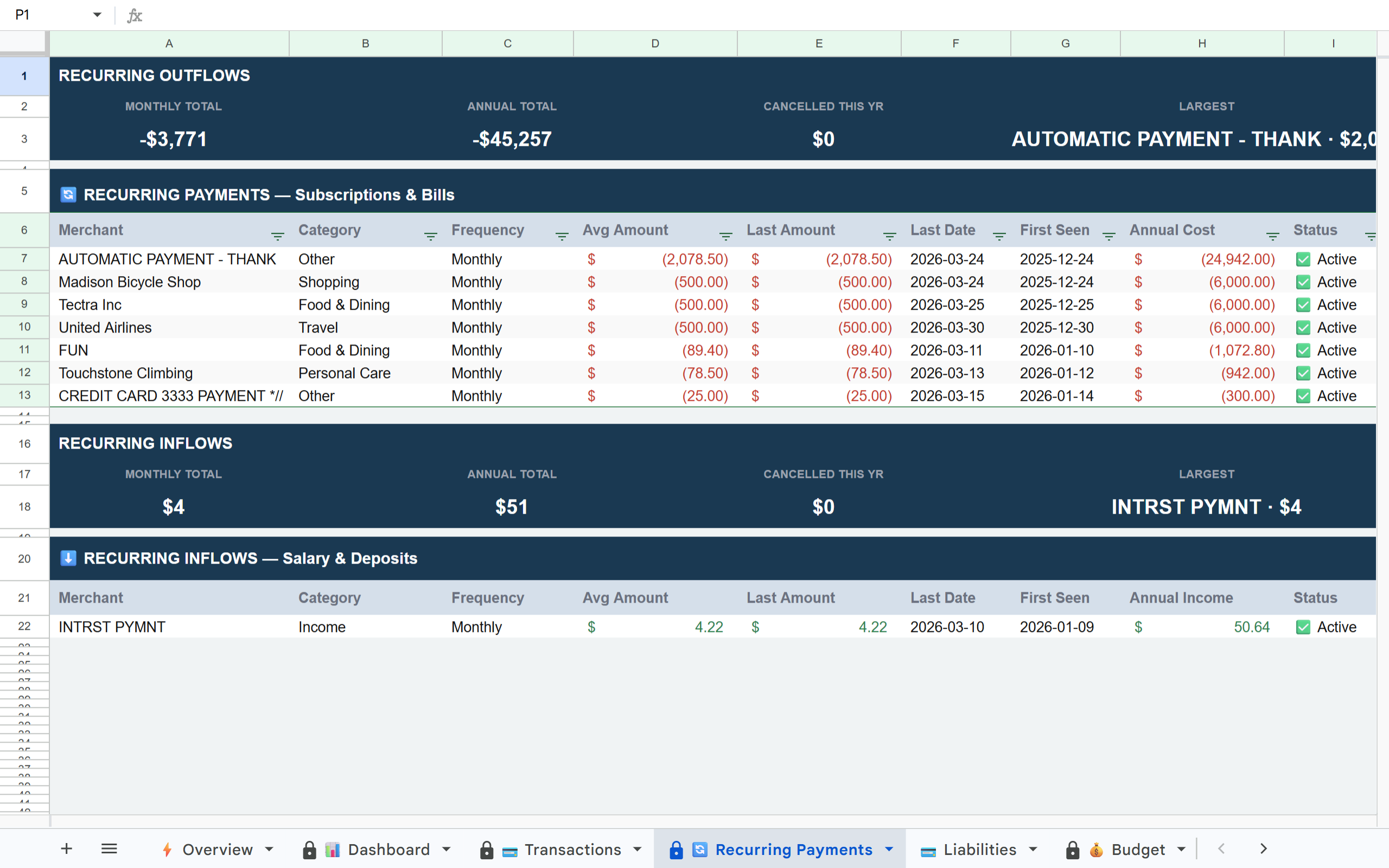
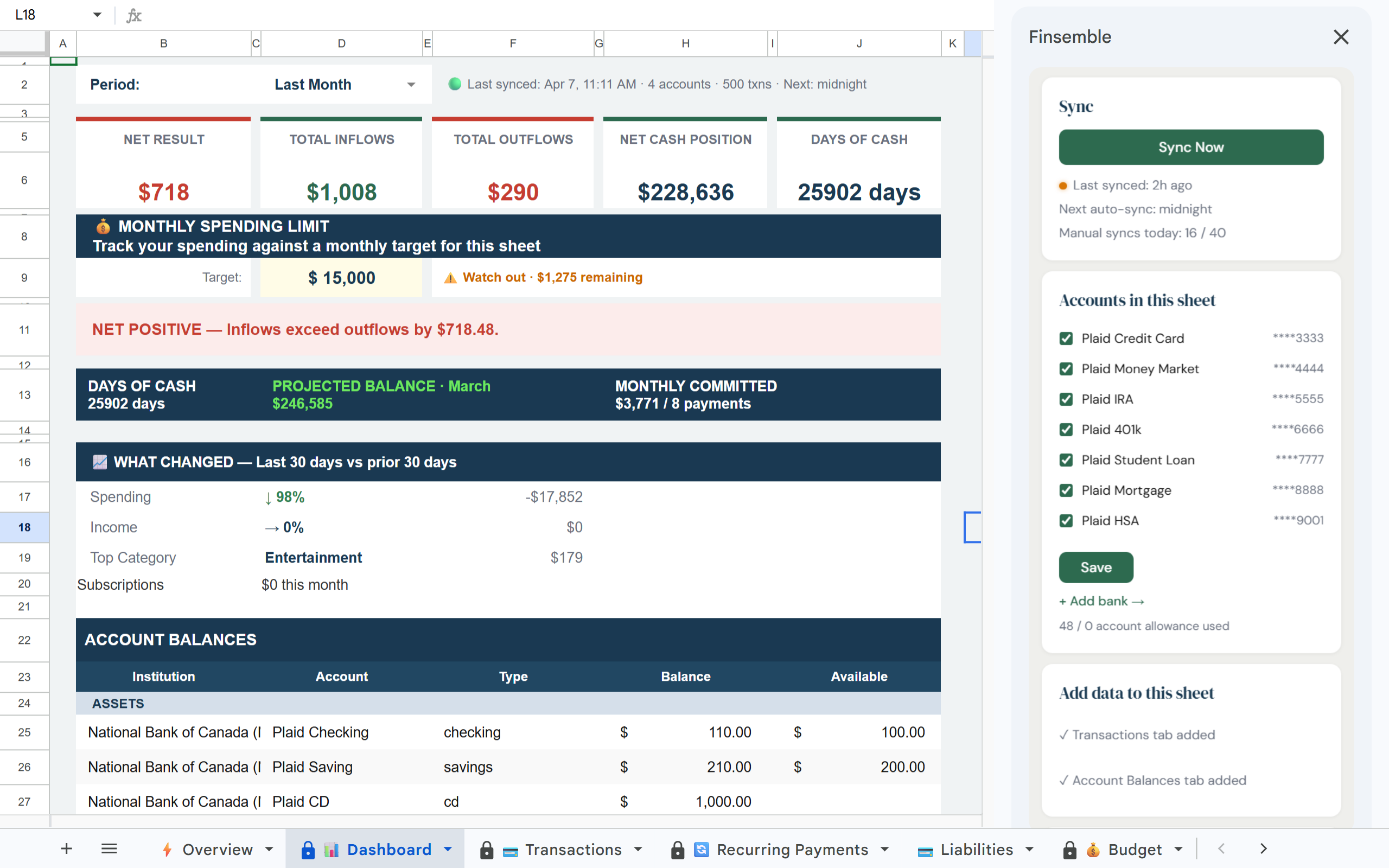
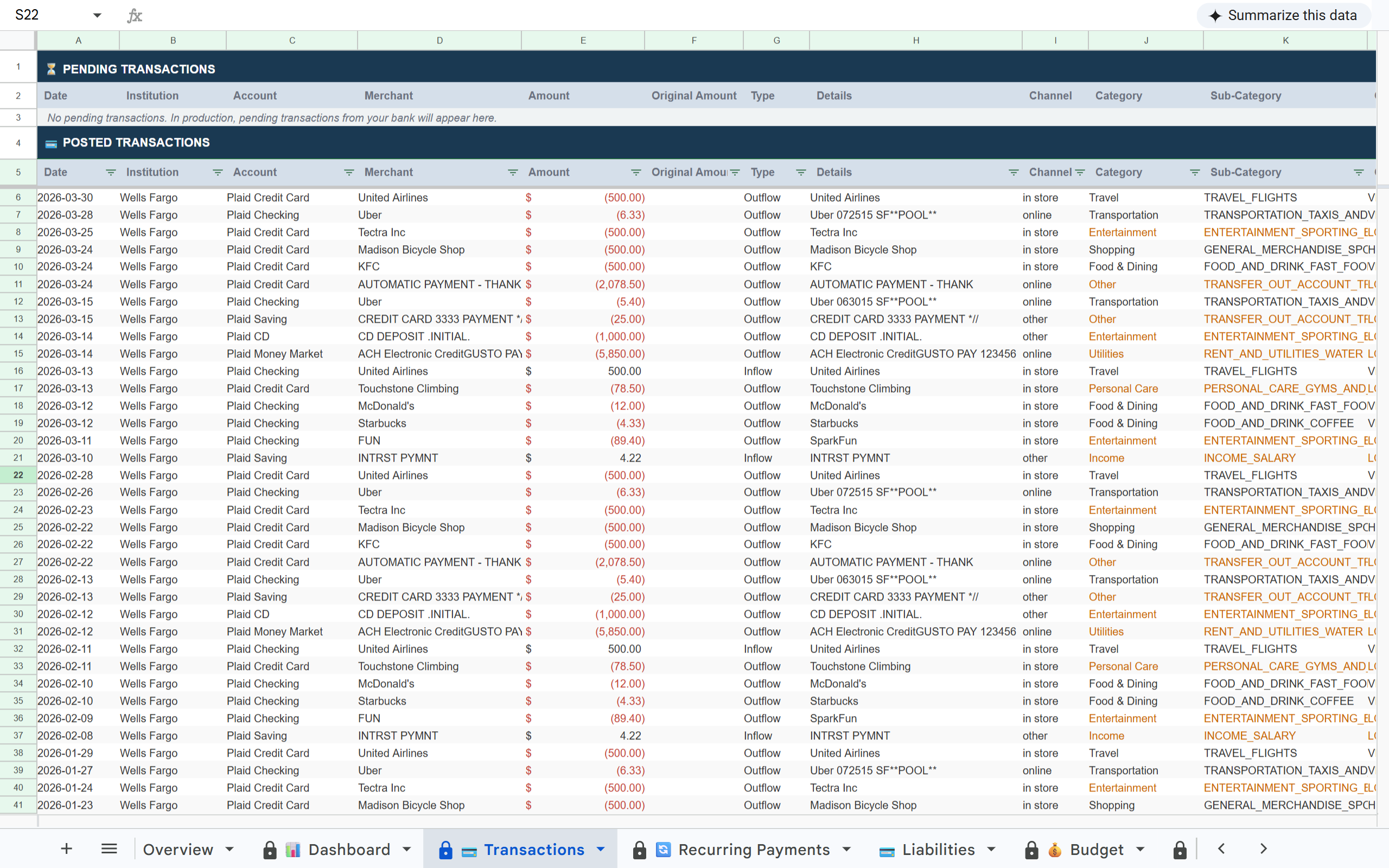
Connect your accounts once. Finsemble creates a structured Google Sheet in your Drive with everything pre-built. No setup, no formulas to write, no maintenance required.

Finsemble Dashboard tab in Google Sheets Finsemble Transactions tab in Google Sheets Finsemble Recurring Payments tab in Google Sheets

How it works

1

Connect your accounts

Link your bank accounts, credit cards, and investment accounts via Plaid. The same secure connection layer used by Venmo and Coinbase. Takes about 2 minutes.

2

Your sheet is created automatically

Finsemble builds a structured Google Sheet in your Drive with 12 tabs pre-built: Dashboard, Transactions, Recurring Payments, Budget, Holdings, Alerts, Balance History, P&L, Liabilities, Investment Transactions, Savings, and an Overview tab.

3

Syncs every day without you doing anything

New transactions appear automatically. Balances update. Recurring charges are detected. You open the sheet and it is already current. Connections occasionally need to be refreshed depending on your bank. When that happens, you will see a reconnect prompt. No data is lost.

4

Your data. Your Drive. Forever.

The sheet belongs to your Google account. Share it with your partner, add your own columns, or export it anytime. If you stop using Finsemble, every transaction stays in your Drive.

What you will notice first

After your first sync, three things tend to stand out immediately:

What's in your sheet

📊 Dashboard 💳 Transactions 💰 Budget 🔄 Recurring Payments 💳 Liabilities 📈 P&L 🔔 Alerts 📅 Balance History 💼 Holdings 📊 Inv. Transactions 💰 Savings 📋 Overview

Why other approaches to automating personal finances break down

Built on trust

🔒 Read-only access

Finsemble reads your transactions and balances. We never initiate transactions or move money.

🏦 Powered by Plaid

The same bank connection layer used by Venmo, Coinbase, and thousands of other financial apps. 12,000+ institutions in the US and Canada.

📂 Your Google Drive

Your sheet is created in your own Google Drive. Not our servers. Even if you cancel Finsemble, your sheet and data remain yours permanently.

🔐 No credentials stored

We never see or store your bank username or password. Plaid handles authentication using bank-grade security.

Frequently asked questions

Yes. Finsemble works equally well for individuals, couples, and families. The Dashboard shows your full financial picture, assets, liabilities, net worth, monthly spending, regardless of whether you use it for personal or business finances.
Yes. The sheet lives in your Google Drive and you can share it with anyone using standard Google Drive sharing. Your partner can view or edit it the same way they would any other shared Google file.
Yes. Connect as many accounts as you want. Multiple banks, credit cards, and investment accounts all consolidate into one sheet automatically.
Your sheet stays in your Google Drive exactly as it is. Every transaction, balance, and tab remains intact permanently. Sync stops but your data is yours forever.
Mint and Monarch are apps with their own dashboards. Your data lives on their servers. Finsemble puts your data directly into a Google Sheet you own. You can edit it, add formulas, share it, and build on it. And when you cancel, nothing disappears.

Stop updating your spreadsheet by hand.

Connect your accounts once and your financial picture updates itself every day.

Takes about 2 minutes · Read-only access · Your data stays in your Google Drive