Tiller Alternative

Looking for a Tiller alternative? Here's what's different.

Tiller Money is excellent for spreadsheet experts who want to build their own system from raw data. Finsemble is built for people who want the complete system, pre-built, structured, and ready when you open it, without the $79/year commitment upfront.

Tiller Money
  • Raw transactions, you build the dashboard
  • Template setup and AutoCat rules required
  • $79/year subscription, no permanent free tier
Finsemble
  • Complete 11-tab system, ready on first sync
  • No setup, connect and everything is built
  • From $40/year, free tier available

Your spreadsheet lives in your Google Drive, where you control it.

Get your sheet →

11-day Pro trial. No credit card required.

Finsemble is a Google Sheets-based alternative to Tiller Money that automatically syncs bank transactions via Plaid. Tiller delivers raw transactions and templates you configure. Finsemble delivers a pre-built 11-tab financial system, structured and populated on first sync.

Tiller gives you the building blocks. Finsemble gives you the finished system.

When Tiller Money is the right choice

Tiller is the better choice in three specific cases:

Tiller is powerful, if you're ready to build the whole system yourself.

Finsemble gives you the complete system from day one.

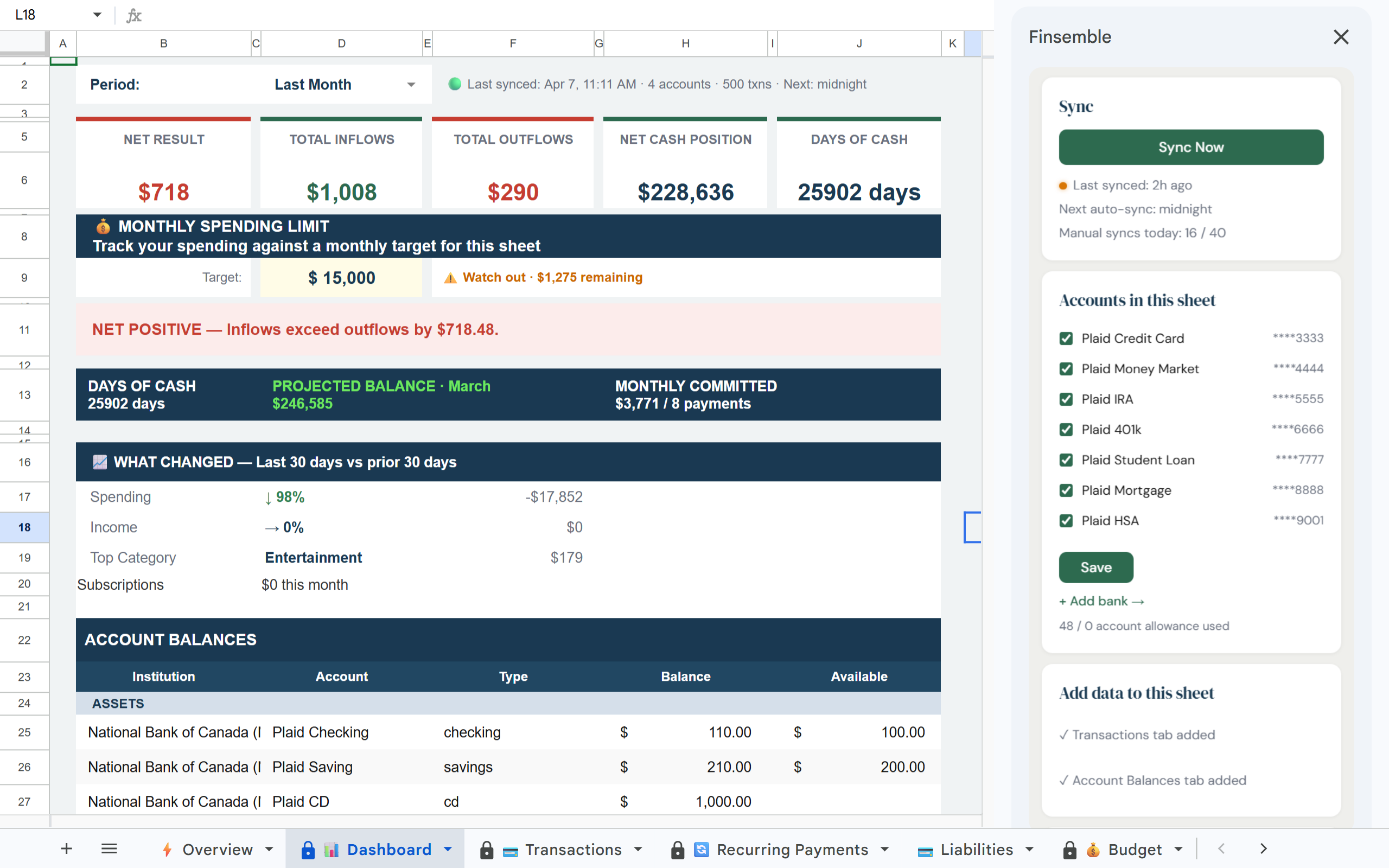
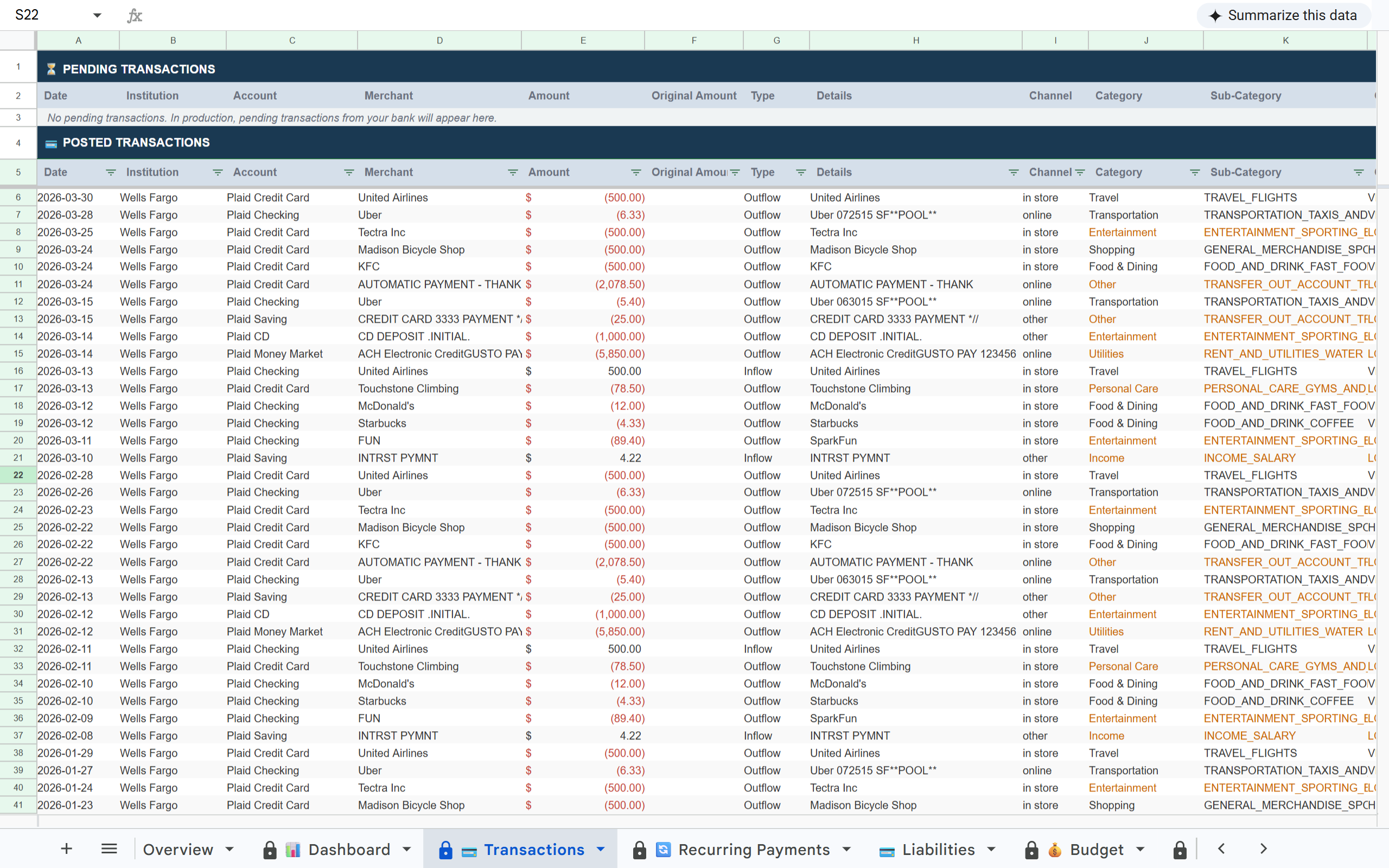
Connect your accounts and Finsemble creates a fully structured Google Sheet, Dashboard, Transactions, Budget, Categories, Recurring Payments, Holdings, Loans, Savings, Balance History, all built and populated on first sync. No templates to configure, no rules to write.

First sync typically completes in under 5 minutes. Your full transaction history syncs on day one.

The spreadsheet stays fully editable in your Google Drive even if you stop syncing later.

Tiller vs Finsemble, side by side

Both sync bank data to Google Sheets. Here's what's different.

Feature Tiller Money Finsemble
Data delivery Raw transactions, you build the dashboard Pre-built 11-tab system, ready on first sync
Setup time High, templates, AutoCat rules, formula work Minutes, connect and your sheet is ready
First-usable-system time 2-4 hours before a complete working setup Under 5 minutes from connect to dashboard
Customisation Maximum, build anything from scratch High, it's a Google Sheet you own completely
Investment tracking Not built in Holdings tab with cost basis, gain/loss (Pro)
Loan tracking Not built in Loans tab with mortgages, student loans (Pro)
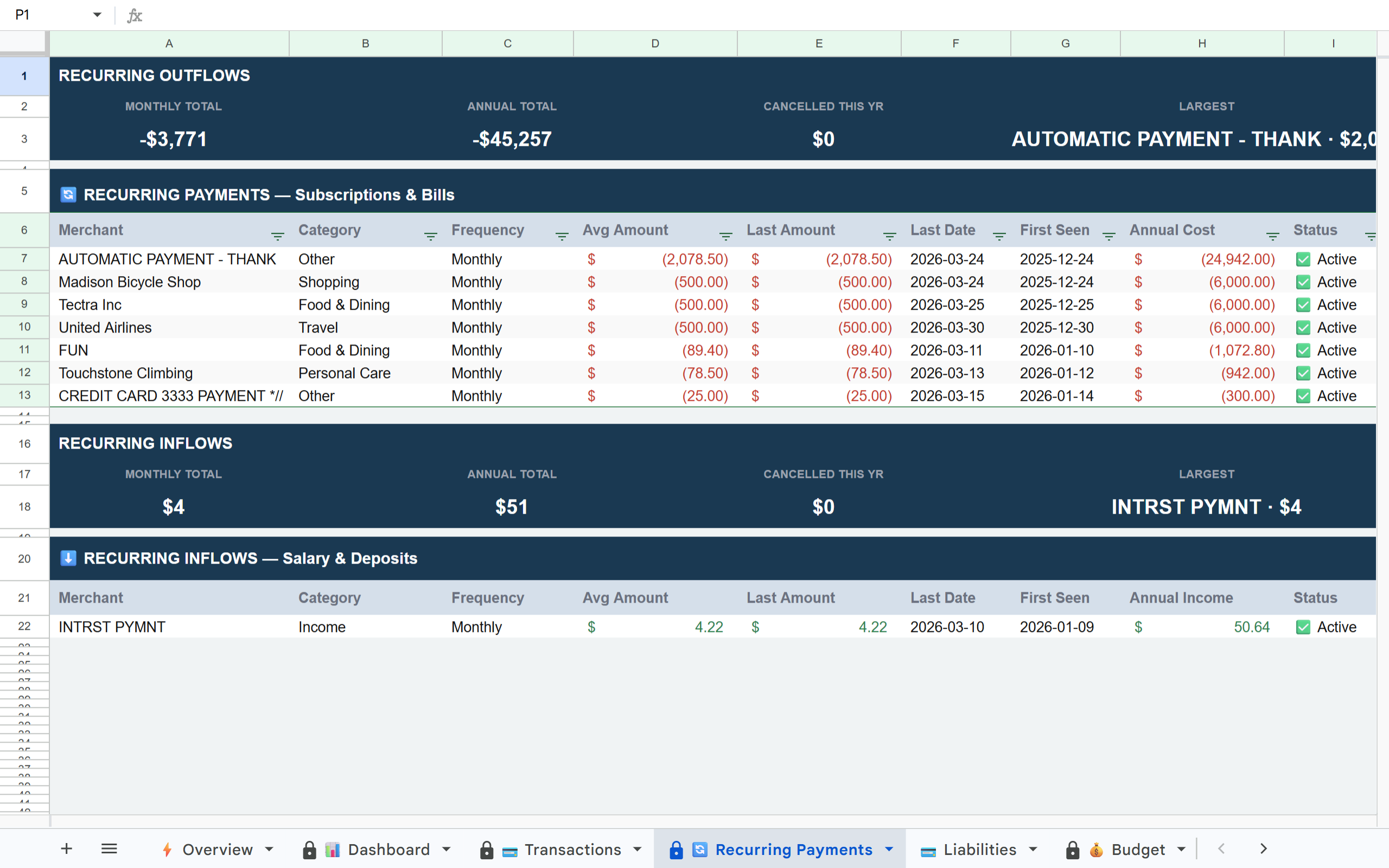
Recurring payments Not built in Auto-detected, sorted by annual cost
Works with Excel Yes No, Google Sheets only
Bank aggregator Plaid + MX (21,000+ institutions) Plaid (12,000+ US and Canada)
Price $79/year flat From $40/year (Lite) to $190/year (Pro)
Free trial 30 days 11 days full Pro access, no credit card
Free tier No permanent free tier (30-day trial only) Yes, free tier available; paid plans include 11-day full Pro trial
Best for Spreadsheet experts who want to build their own system Users who want a complete pre-built financial system

Tiller Money

  • Raw transactions, you build the dashboard
  • High setup: templates, AutoCat rules
  • First-usable system: 2-4 hours before complete working setup
  • Investment tracking not built in
  • Loan tracking not built in
  • Recurring payments not built in
  • Works with Excel: yes
  • $79/year flat
  • 30-day trial
  • No permanent free tier

Finsemble

  • Pre-built 11-tab system, ready on first sync
  • Minutes to set up, nothing to configure
  • First-usable system: under 5 minutes from connect to dashboard
  • Holdings tab with cost basis and gain/loss (Pro)
  • Loans tab included (Pro)
  • Recurring payments auto-detected
  • Google Sheets only
  • From $40/year to $190/year
  • 11-day full Pro trial, no credit card
  • Free tier available

How Finsemble works

01
Connect your accounts

Link your banks securely via Plaid, the same connection layer used by Venmo, Coinbase, and thousands of other financial apps. Read-only access. We never touch your money or store your credentials.

02
Your complete sheet is built instantly

Finsemble creates a structured Google Sheet in your Drive with 11 pre-built tabs. Dashboard, Transactions, Budget, Categories, Recurring Payments, all built and populated. No template to configure. No AutoCat rules to write.

03
It syncs automatically from here

Your sheet updates every day without any action from you. New transactions appear, categories are applied, recurring payments are detected. The manual maintenance Tiller requires is gone permanently.

Which workflow fits the way you manage money?

Both Tiller and Finsemble live in Google Sheets, but they fit different ways of working with money. Which one matches your habits.

Tiller fits best if:
  • You enjoy building spreadsheet systems
  • You want Excel support
  • You customize heavily and maintain your own categorization rules
  • You think of your financial system as a project to develop over time
  • Your bank requires MX rather than Plaid
Finsemble fits best if:
  • You want a working system immediately, not a project to build
  • You prefer structure over setup
  • You want automation without spreadsheet engineering
  • You want investment tracking, loan tracking, and recurring payment detection without building those tabs yourself
  • You want to try a free tier before committing

Everything in your sheet on day one

11 tabs. Pre-built. No setup.

🏦Liabilities
📋P&L
🔔Alerts
📉Balance History
💼Holdings
📒Inv. Transactions
💰Savings

Built on the same infrastructure as the apps you already trust

🔒
Read-only access

Finsemble can never move money, initiate payments, or modify your accounts. Read-only transaction data only.

🏦
Powered by Plaid

The same bank connection layer used by Venmo, Coinbase, and 8,000+ financial apps. Your credentials go to Plaid, not Finsemble.

📂
Your Drive, your data

Your sheet lives in your Google Drive permanently. Even if you cancel Finsemble, your sheet and every row of data stays yours forever.

🚫
No credentials stored

Your bank login credentials are never stored by Finsemble. Plaid handles authentication and passes only transaction data to us.

The system you want, without building it yourself.

Tiller gives you the data pipe. Finsemble gives you the complete financial system, dashboard, budget, recurring payments, investments, all pre-built and connected to your real accounts. Start your 11-day trial and your full financial picture is ready before you'd finish configuring Tiller's first template.

11-day full Pro trial No credit card required Your sheet stays in your Drive forever

Frequently asked questions

Is Tiller worth $79/year?
Tiller is worth $79/year if you want to build your own financial system from raw transaction data and are comfortable investing time in template configuration and AutoCat rules. If you want a pre-built system that's working in minutes, Finsemble Lite is half the cost at $40/year. The question is whether you want to be the architect of your sheet or have it pre-built.
How long does Tiller take to set up?
Tiller's foundation template loads in minutes, but configuring it for your spending patterns, setting up AutoCat rules, and tailoring the dashboard typically takes multiple hours of focused work before you have an accurate picture. Many users continue refining their setup over time as their workflow evolves. Finsemble's first sync produces a working 11-tab system in under 5 minutes with no configuration required.
Can I try Finsemble without paying first?
Yes. Finsemble has a free tier with basic functionality, and an 11-day full Pro trial that does not require a credit card. Tiller offers a 30-day trial but requires a credit card upfront. The free tier means you can keep using Finsemble's basic sync indefinitely without paying.
What does Tiller do better than Finsemble?
Tiller supports Microsoft Excel in addition to Google Sheets, works with MX in addition to Plaid (more bank coverage), and offers AutoCat, a fully customisable categorisation rule system. It's also better for users who want to build their own template from scratch.
What does Finsemble do better than Tiller?
Finsemble provides a complete pre-built financial system, not just raw transaction data. Investment tracking, loan tracking, recurring payment detection, budget vs actual, and a full dashboard all come ready on first sync without any setup. It's significantly better for users who want a complete picture immediately.
If I'm currently using Tiller, can I switch to Finsemble?
Yes. Sign up for a Finsemble trial, connect your banks, and compare the two sheets side by side during your 11-day trial. Your existing Tiller sheet is untouched. Finsemble creates a new sheet in your Drive.
What if I want both Tiller's flexibility and Finsemble's pre-built structure?
Finsemble's sheet is a Google Sheet you own completely, you can add tabs, formulas, and customisation after the initial setup. Many users start with Finsemble's pre-built structure and then customise from there, getting the best of both approaches.
Is Finsemble cheaper than Tiller?
For comparable usage (one primary sheet, a few bank accounts), Finsemble Lite at $40/year is cheaper than Tiller at $79/year. For power users with many accounts and multiple sheets, the comparison depends on plan choice. All paid plans include an 11-day full Pro trial, no credit card required.
The complete financial system Tiller doesn't provide.

Connect your accounts and your full financial picture, dashboard, budget, recurring payments, investments, is ready in minutes. No template setup. No AutoCat rules. Just your data, organised.

Get your sheet →

11-day Pro trial. No credit card required. Curious about plans? See pricing →