Small business finances in Google Sheets. Automated and always current.
Connect your business bank accounts, credit cards, and investment accounts once. Finsemble builds a structured financial sheet in your Google Drive and keeps it updated automatically. Cash flow, expenses, recurring costs, and P&L, without your accounting team doing manual exports.
Free Google Sheets template for small business finances. Includes 11 days of automatic bank sync, and the template stays in your Drive after.
Takes about 2 minutes · Read-only access · Your data stays in your Google Drive
🏦 Powered by Plaid🔒 Read-only bank access📂 Your sheet lives in your Google Drive
Finsemble is a Google Sheets template for small business finances that auto-fills from your connected bank accounts. The template lives in your Google Drive, and automatic sync keeps it current via Plaid.
Your accounting team is spending hours every month on work that should not be manual.
✗ Every month someone on your team exports CSVs from three bank accounts, pastes them into the master sheet, fixes the categories, updates the currency rates, and reconciles the totals. It takes hours and it happens every single month.
✗ You have a Google Sheet that tells you where the business stood last month. Getting to this month requires another round of that same manual process.
✗ Your accountant asks for the latest numbers and someone has to stop what they are doing to pull an export, clean it up, and send it over.
Why small businesses run on Google Sheets even when they have accounting software
QuickBooks is for your accountant. Google Sheets is for you.
Sheets is where you build financial models, run scenarios, track cash flow against projections, and share live data with your team. It is flexible in a way accounting software never is. The problem is that getting data from your bank into the sheet requires manual work every single month.
Finsemble is the automation layer that connects your bank accounts directly to your Google Sheet. The data flows automatically. Your accounting team stops touching CSV files. Your accountant gets a live, structured sheet whenever they need it.
Your business financials. In Google Sheets. Updated without any manual work.
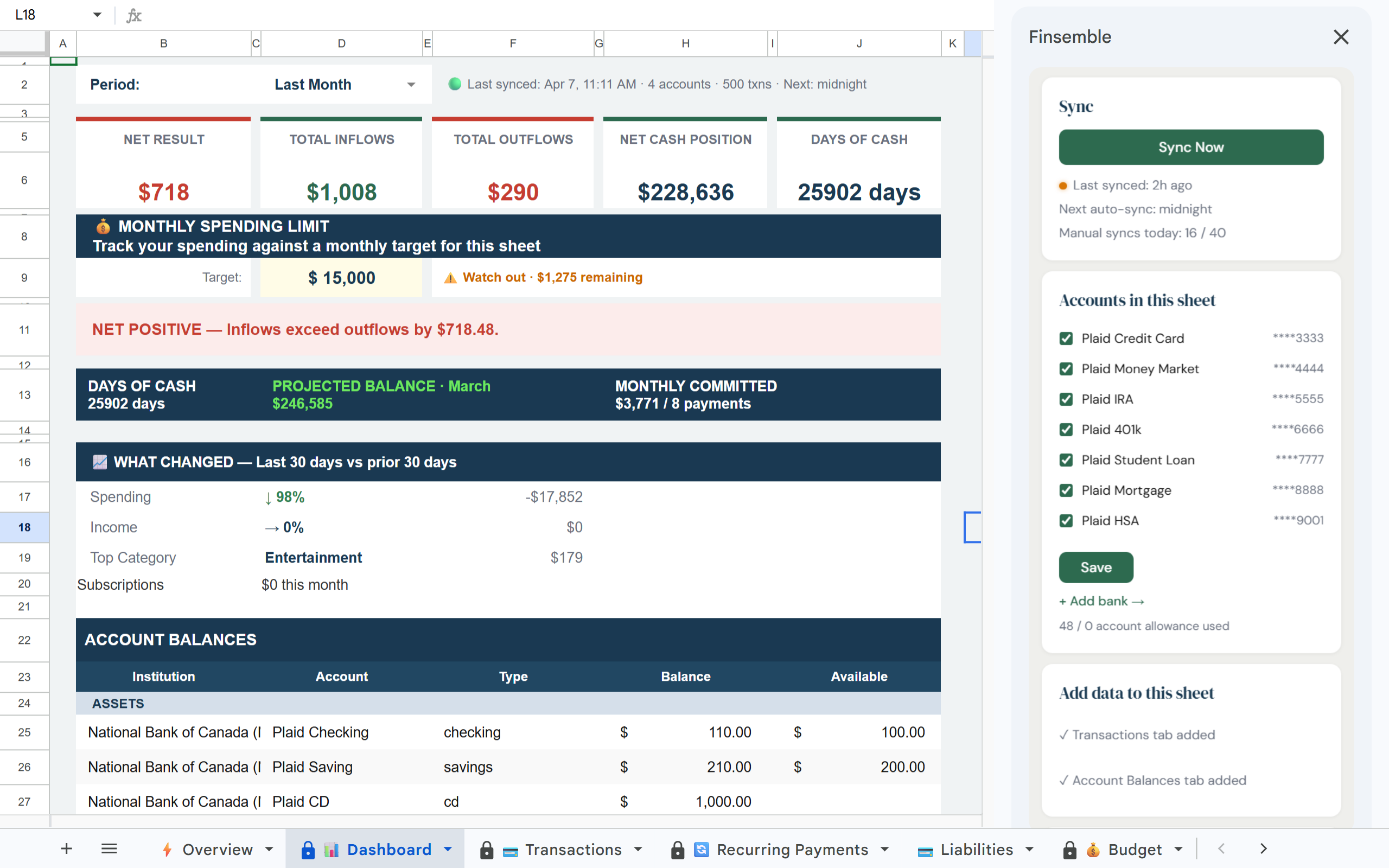
Connect your business accounts once. Finsemble syncs transactions, balances, recurring costs, and P&L automatically into a Google Sheet in your Drive. Your team and your accountant can access it anytime.
1 / 3·Dashboard
How it works
1
Connect your business accounts
Link checking, savings, credit cards, and any other business accounts via Plaid. Multiple entities can connect to separate sheets.
2
Your financial sheet is created automatically
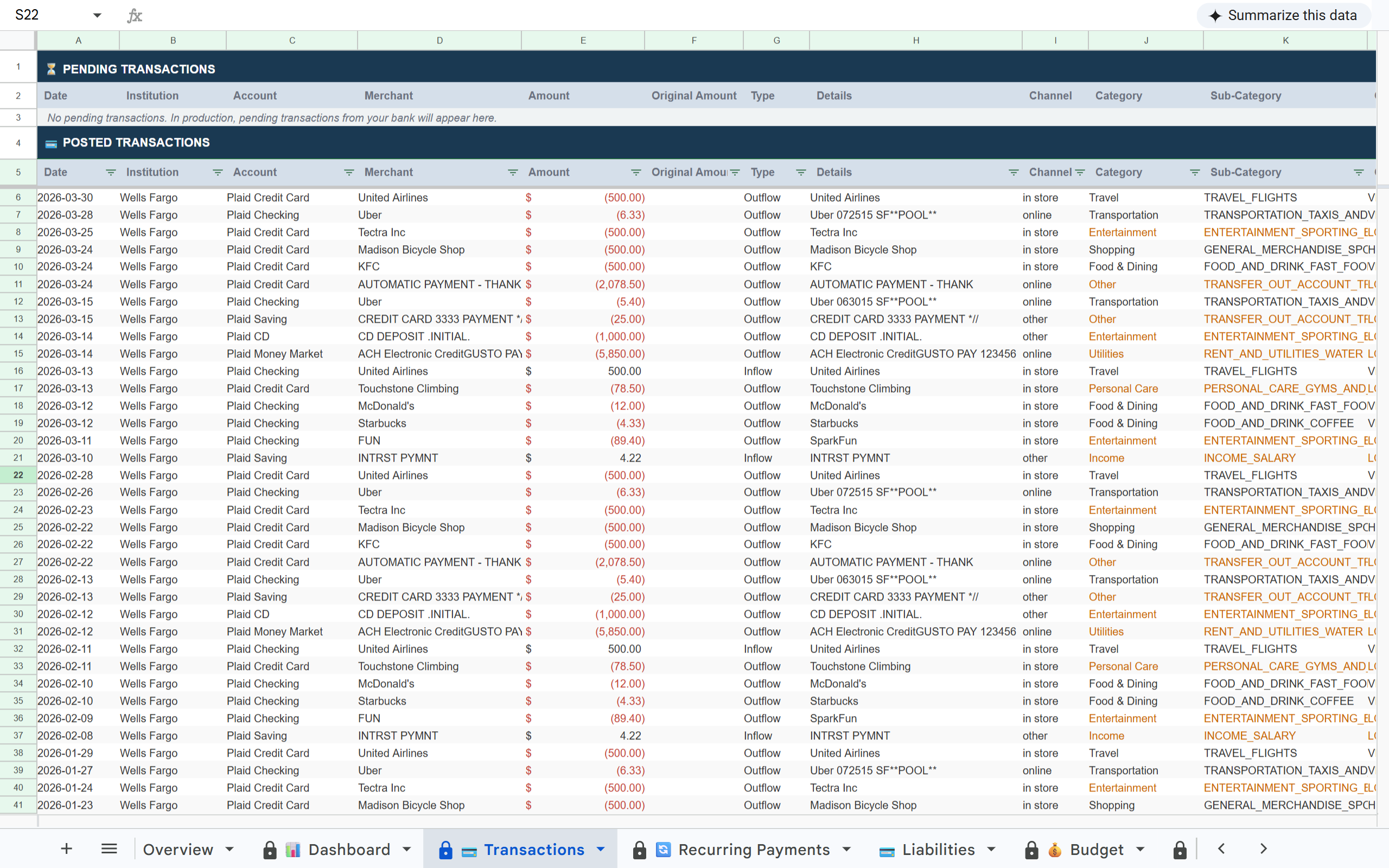
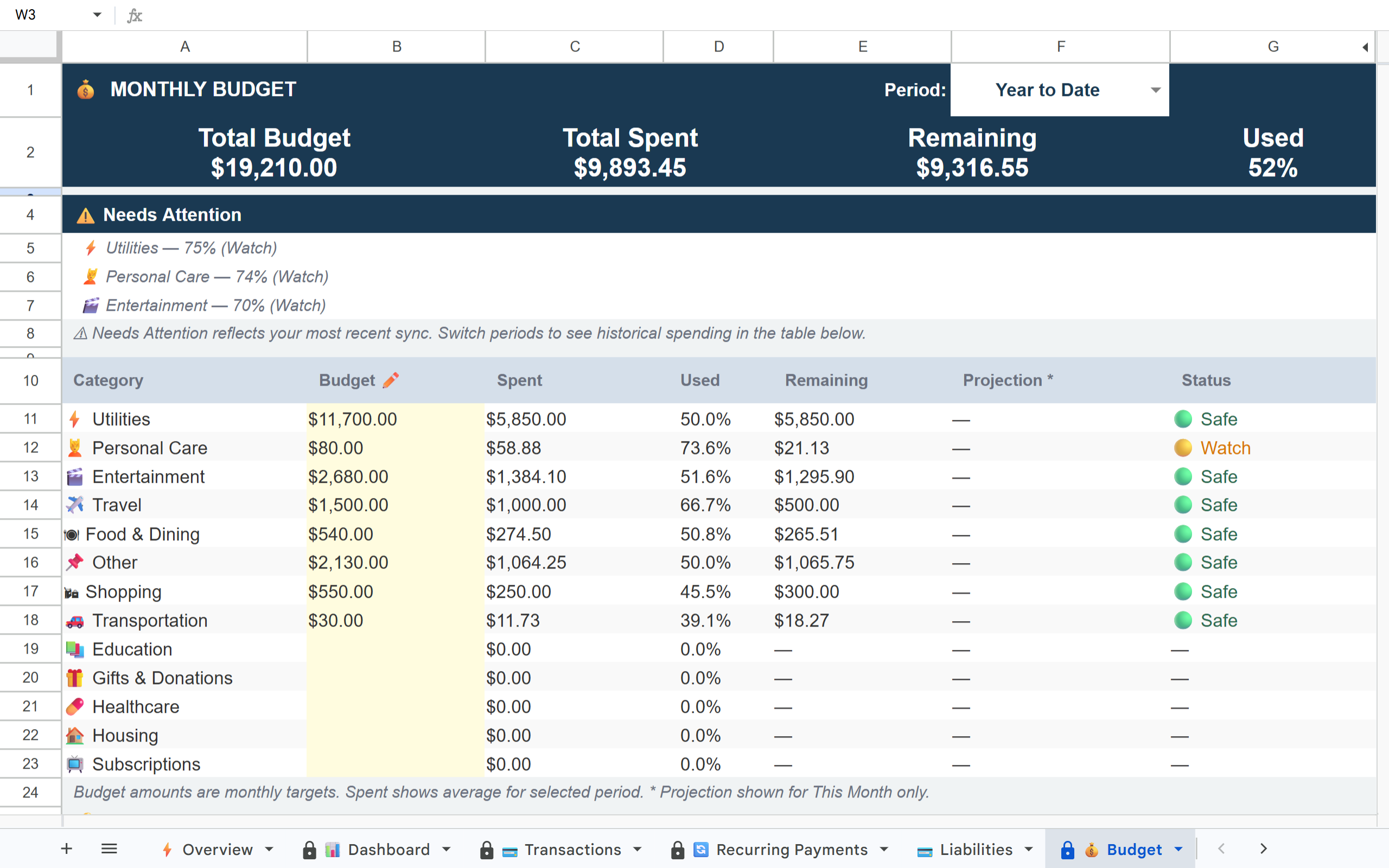
A structured Google Sheet lands in your Drive with a Dashboard, full transaction history, recurring payments tracker, budget vs. actual, P&L, and more, all pre-built.
3
Syncs automatically. Your team does nothing.
New transactions appear daily. Recurring charges are detected automatically. Currency conversions apply if you have foreign accounts. No exports, no manual entry, no reconciliation. Connections occasionally need to be refreshed depending on your bank. When that happens, you will see a reconnect prompt. No data is lost.
4
Share with your accountant like any Google file
Your accountant gets a direct link to a clean, structured sheet. They work in Sheets already. No new tools, no exports, no back-and-forth.
Templates, QuickBooks, or Finsemble: which fits your business?
Need
Downloadable templates
QuickBooks
Finsemble
Live bank sync
No, manual entry
Yes
Yes
Lives in your Google Drive
Yes
No
Yes
Custom dashboards and formulas
Manual
Limited
Full (it's a sheet)
Daily cash visibility
Only if you update it
Partial
Yes
Multi-account consolidation
Manual paste
Yes
Yes
Built for accounting workflows
No
Yes
Works alongside accounting software
Free template you keep
Yes
No
Yes (during and after trial)
Cost
$0 to $50 one-time
$30 to $200/month
Free template, $4 to $19/month for sync
Templates are great for a snapshot. QuickBooks is great for your accountant. Finsemble is for the operational view your team checks daily, with the data flowing in automatically. Most small businesses use Finsemble alongside QuickBooks, not instead of it.
Pick the tool that matches how your business actually runs
A downloadable template is enough if you:
✓ Have a side business with simple monthly tracking needs
✓ Don't mind manual data entry from bank statements
✓ Don't need a current view, just a monthly snapshot
✓ Have one or two accounts to track
QuickBooks or Xero is the right tool if you:
✓ Need formal bookkeeping with tax filings
✓ Send invoices and process payroll through the same system
✓ Have an accountant who works in QuickBooks
✓ Don't need a Google Sheets view of operational finances
Finsemble fits if you:
✓ Already use Google Sheets for cash flow, projections, or operational visibility
✓ Have multiple business accounts to consolidate (checking, savings, credit cards)
✓ Want your accountant to see live numbers without an export
✓ Need a current view of where the business stands today, not last month
What small business owners actually check every morning
Small business owners do not make decisions once a month. They make them every morning. Finsemble surfaces the numbers that actually drive those decisions.
Cash position across every account. Checking, savings, credit cards, and any operating reserves in one view. No logging into five banking portals.
Recurring costs with annual totals. Every subscription, vendor payment, software charge, and recurring bill detected automatically. The line item that doubled last month is easy to spot.
Payroll runway. How many payroll cycles can the business cover from current cash plus expected receivables. The single most important number most operators can't see at a glance.
Unusual transactions flagged automatically. Large charges, new vendors, or unexpected categories surface in the Alerts tab before they become a surprise.
Current P&L without waiting for month-end. Revenue and expenses categorized as transactions land, not 30 days later.
Why small businesses outgrow CSV exports and basic tools quickly
Manual CSV exports: Every month, someone has to remember, execute, and clean up the export. One missed month becomes a two-month backlog.
QuickBooks or Xero alone: Great for accounting. Not built for the financial modeling and cash flow analysis that operators actually do in Google Sheets. Most small businesses run both anyway.
Zapier bank-to-sheets automations: Technically possible but fragile. Breaks when banks update their APIs. Does not handle deduplication. Falls apart when you add a new account.
Built on trust
🔒 Read-only access
Finsemble reads your transactions and balances. We never initiate transactions or move money.
🏦 Powered by Plaid
The same bank connection layer used by Venmo, Coinbase, and thousands of other financial apps. 12,000+ institutions in the US and Canada.
📂 Your Google Drive
Your sheet is created in your own Google Drive. Not our servers. Even if you cancel Finsemble, your sheet and data remain yours permanently.
🔐 No credentials stored
We never see or store your bank username or password. Plaid handles authentication using bank-grade security.
Frequently asked questions
Partly. When you connect your bank, Finsemble creates a Google Sheets template in your Drive that auto-fills with your transactions. The template stays in your Drive after the sync trial ends. You keep the sheet, the formulas, and all data synced during the trial. What stops after the trial is the automatic bank sync.
Yes. Connect as many accounts as you need. Multiple checking accounts, savings, credit cards, and investment accounts all consolidate into one sheet.
Yes. Create a separate Finsemble sheet for each entity and assign specific accounts to each. On Pro you can create unlimited sheets.
Yes. Share the Google Sheet directly with your accountant using standard Google Drive sharing. They can view or comment without needing a Finsemble account.
No, and it is not designed to. Finsemble works alongside your accounting software as the data layer that keeps your Google Sheets current. Your accountant still uses QuickBooks for the formal books. You use Sheets for operational visibility.
Yes. Foreign accounts are converted to USD automatically using live exchange rates on every sync. The original currency and amount are preserved alongside the converted value.
Your business finances. Current. Without the manual work.
Connect your accounts and get a business financial sheet that updates itself every day.