Now in early access

All your financial accounts.
One Google Sheet.
Automatically.

Built for freelancers, small businesses, and accountants who already manage finances in Sheets. Connect your bank accounts and every transaction flows automatically into a structured Google Sheet — in your Drive, fully yours.

📂 Your financial spreadsheet stays in your Google Drive, where you control it.

✓ Connected live — not a downloadable template
✓ No CSV imports, no manual entry
✓ Share with your accountant in seconds
✓ Keeps your spreadsheet in sync with connected accounts
✓ Free plan available  See pricing →

11-day Pro trial · No credit card required

🔒 Bank-level security via Plaid · 👁 Read-only account access · 📂 Your data in your Google Drive · 🤝 Share with your accountant instantly
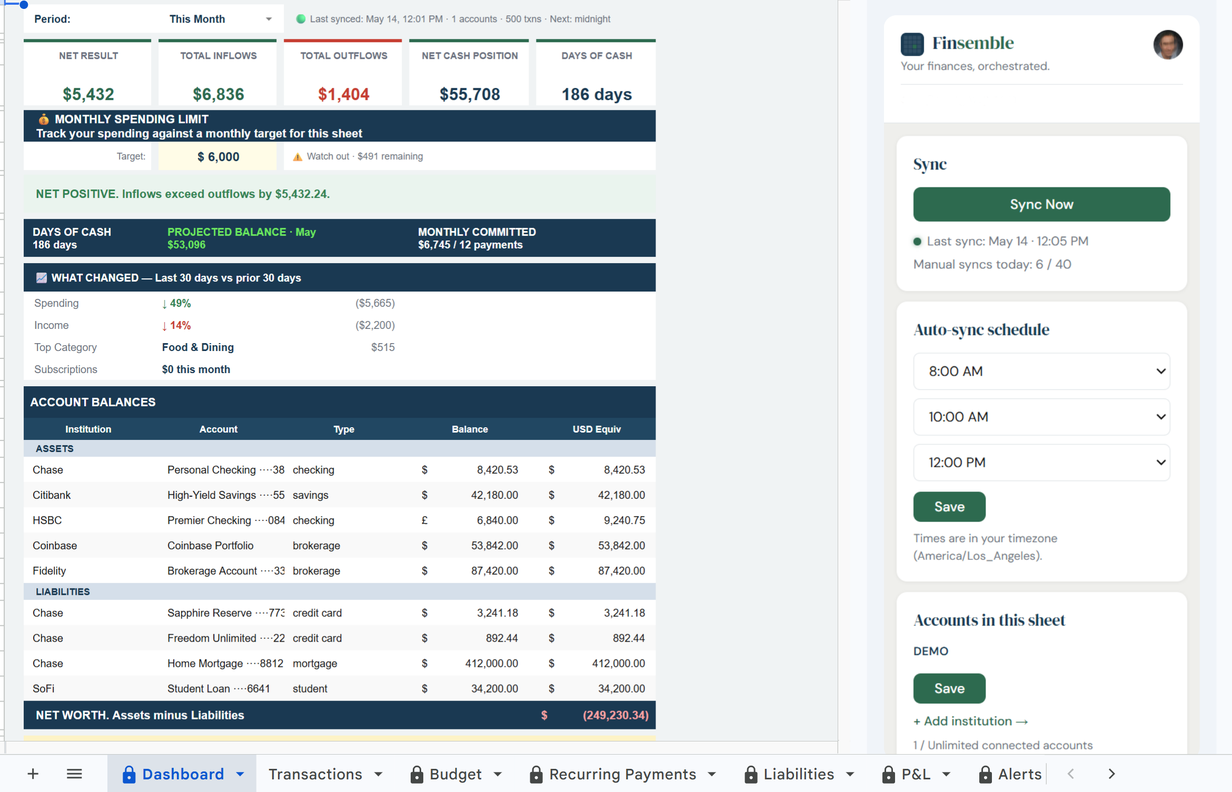
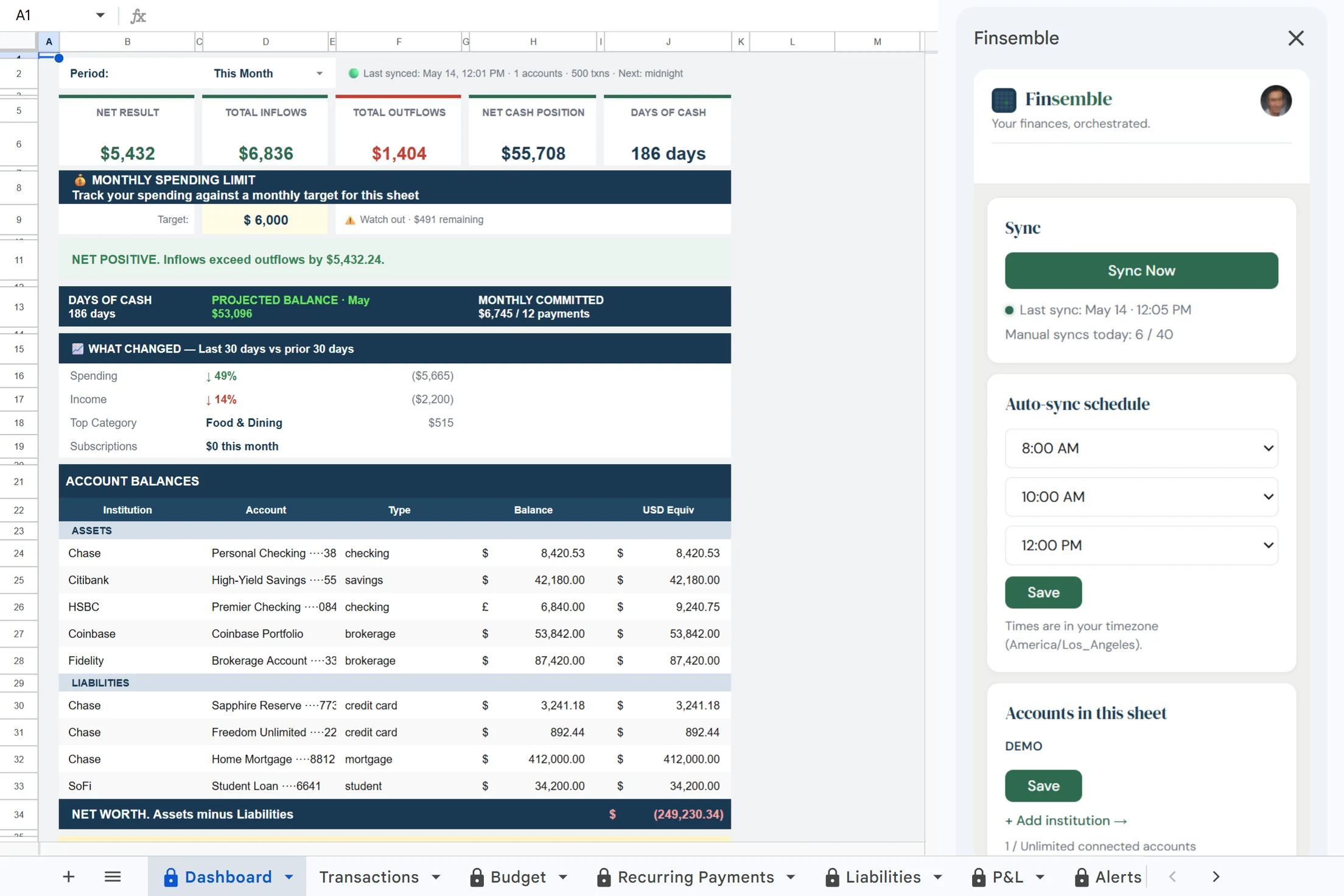
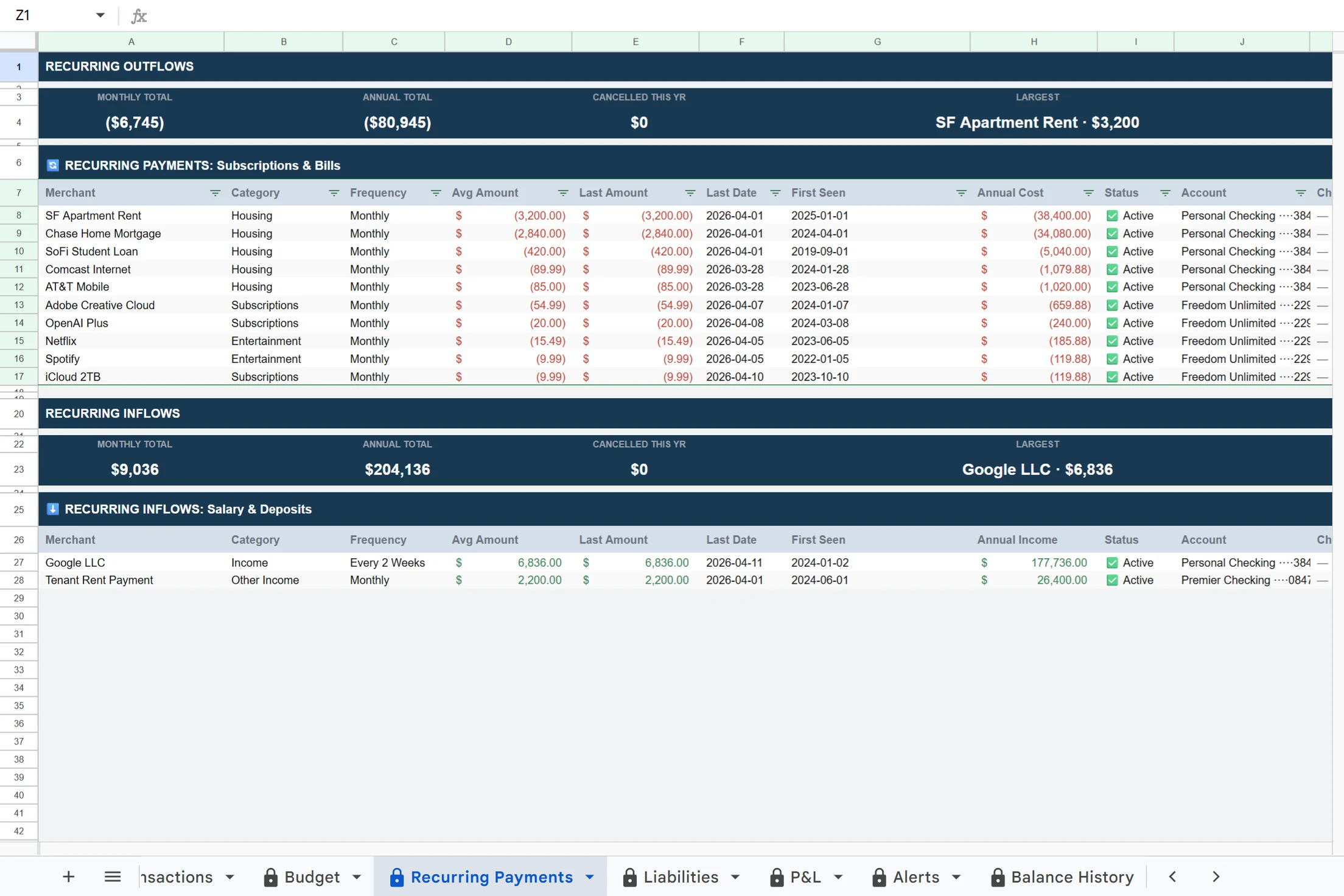
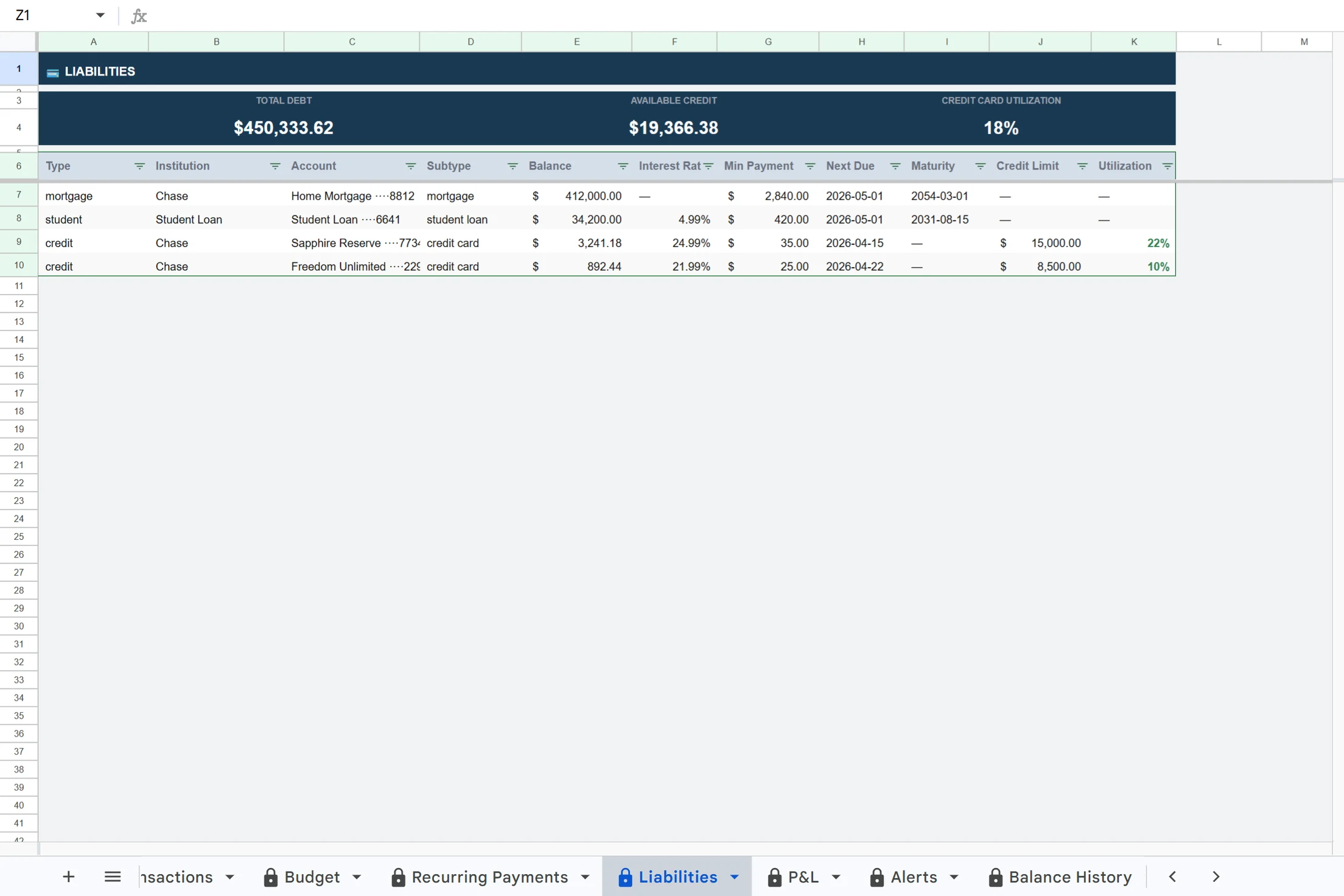
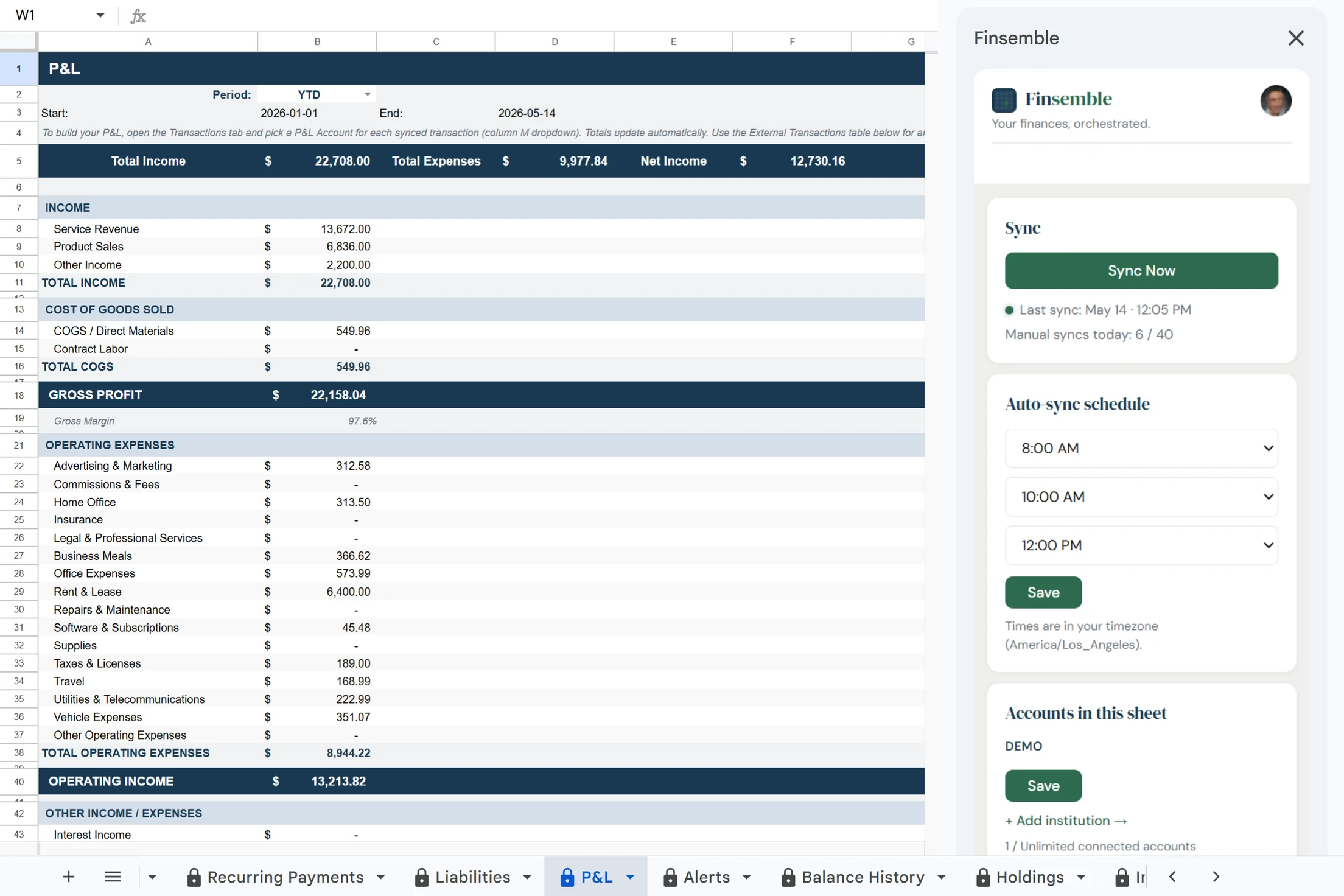
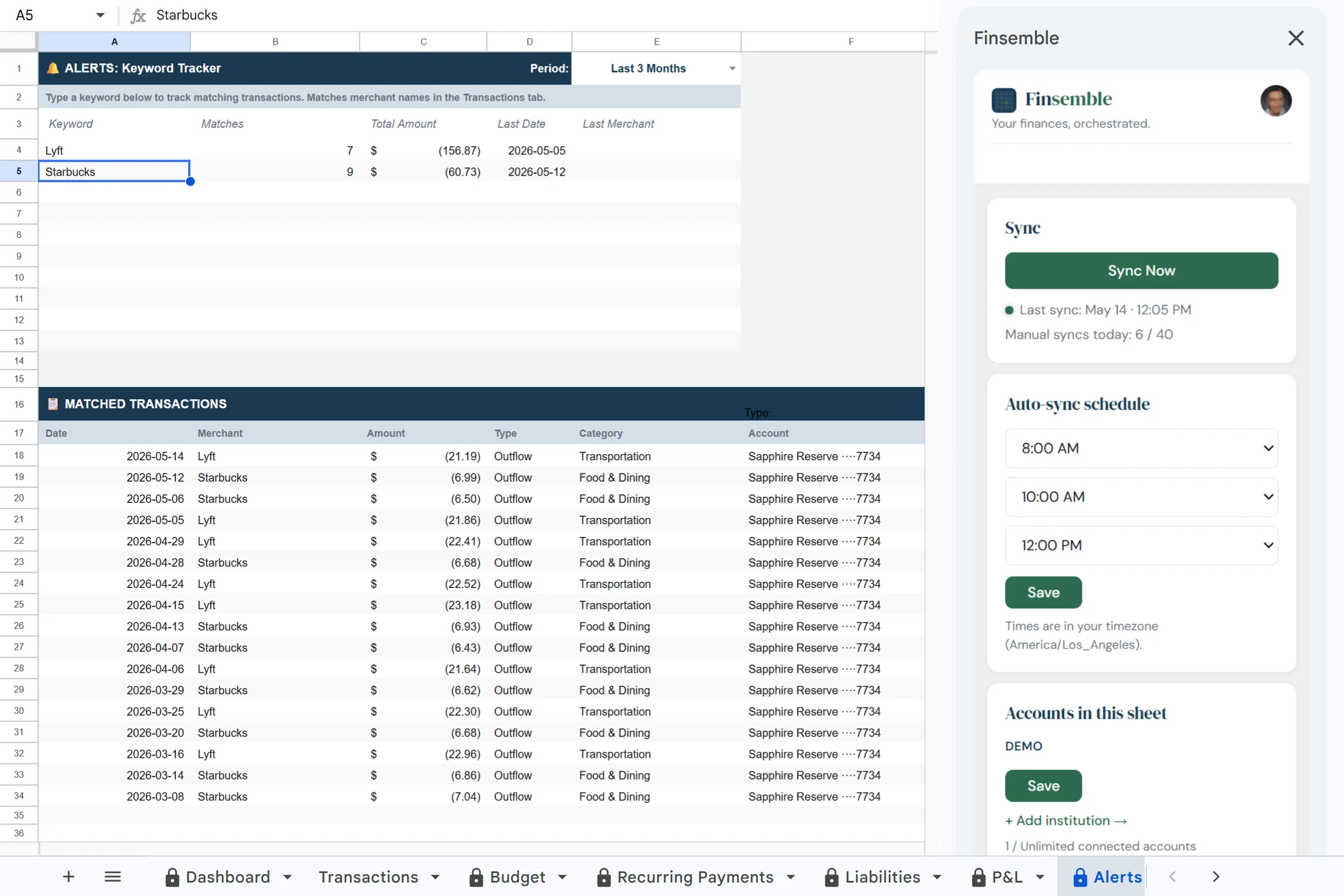
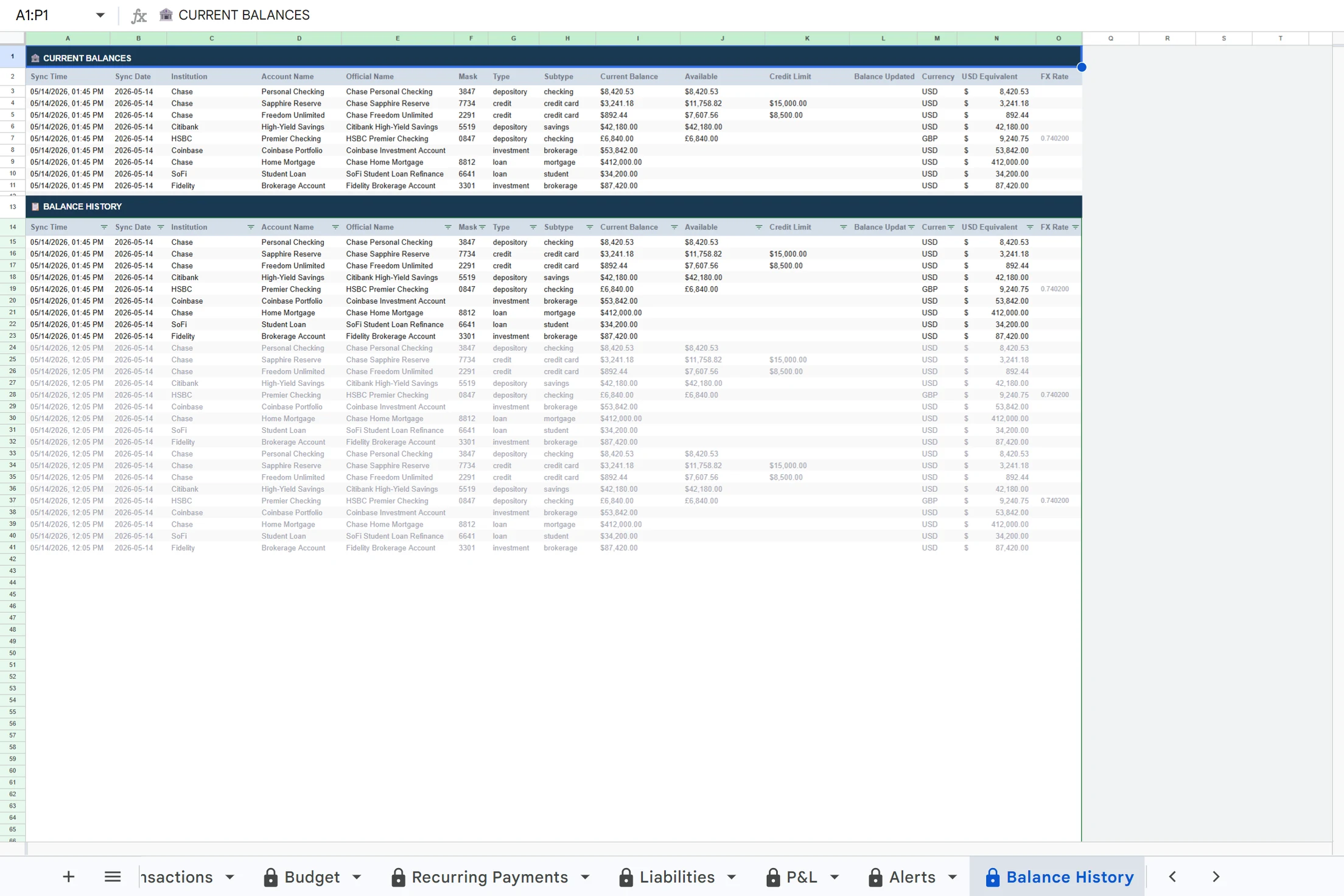
Finsemble Dashboard — live financial data in Google Sheets
How it works

From bank account to
Google Sheet in minutes.

01

Connect your accounts

Connect your bank accounts through Plaid — the same infrastructure used by Venmo, Coinbase, and thousands of other apps.

02

Finsemble creates your sheet

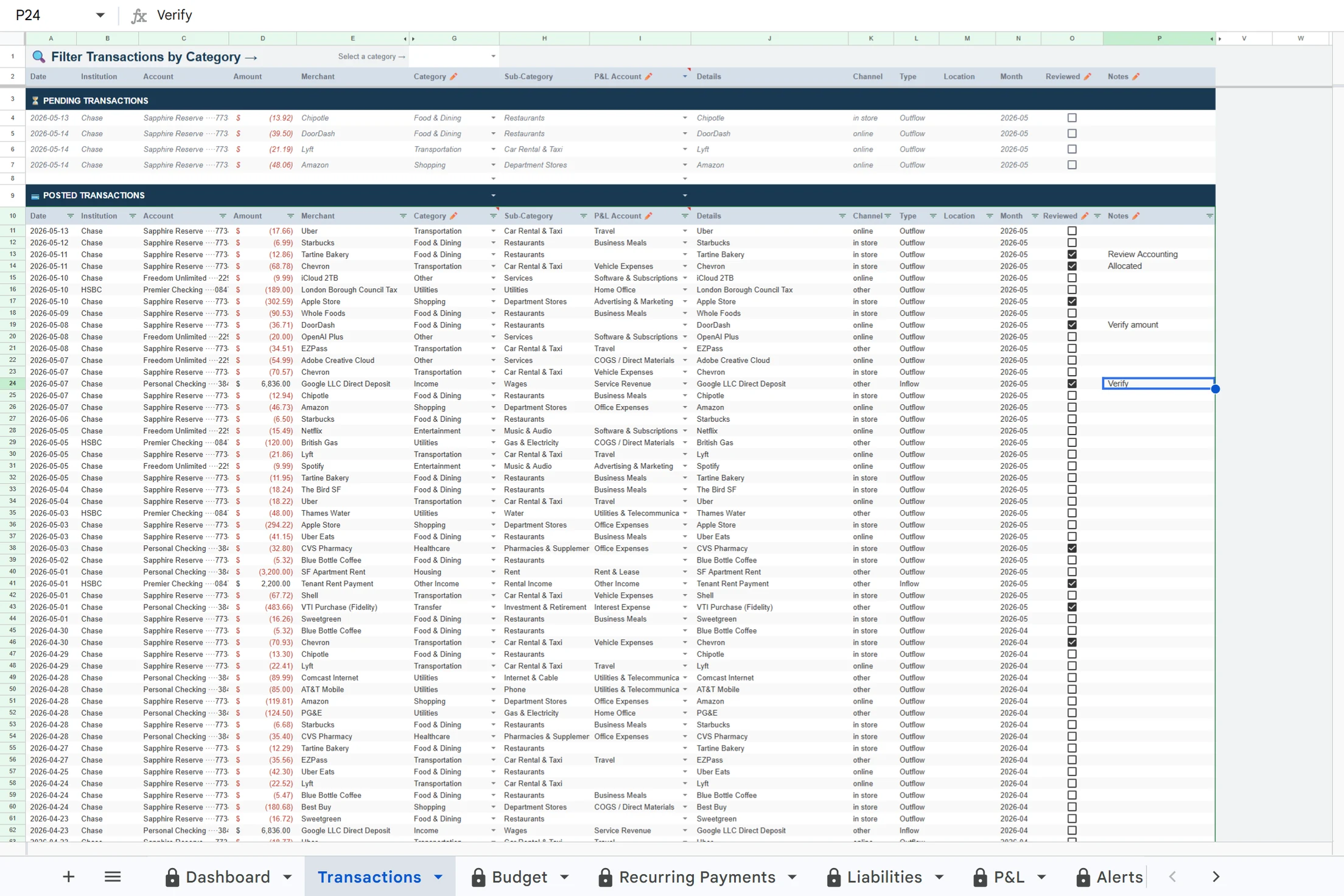
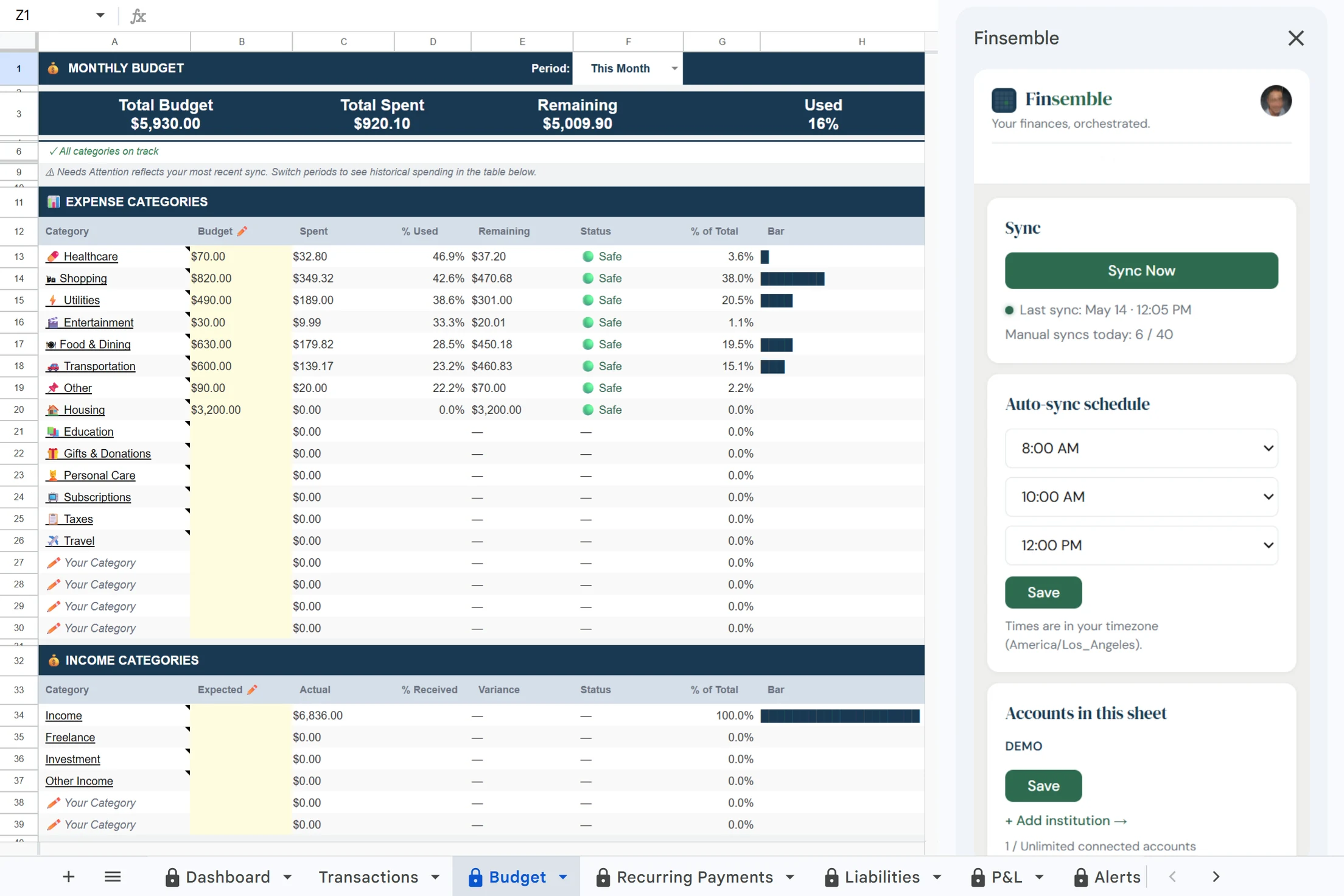
A structured Google Sheet lands in your Drive with nine tabs pre-built: Dashboard, Transactions, Recurring Payments, Budget, Categories, Alerts, Savings, Holdings, and more.

03

Your sheet stays current

Transactions sync automatically every day. Trigger a manual sync anytime — new charges show up in minutes, not days.

04

Share with your accountant

It's a Google Sheet. Share it the same way you share any Drive file. Your accountant gets clean, structured transaction data in a format they already know.

What you get

Not accounting software.
A clean financial data layer
for Google Sheets.

🏦

Every account in one place

Chase, Amex, Capital One, your credit union. Instead of logging into four apps to get the full picture, it's all in one sheet, kept current automatically.

🏷️

Clear, human-readable categories

Transactions come in tagged with real categories — Food & Dining, Travel, Healthcare. Not bank codes. Not abbreviations. Words that make sense when you're reviewing your month.

📊

Budget and recurring tracking built in

Your sheet ships with a Budget tab and a Recurring Payments tab. Monthly spend vs. budget, all your subscriptions in one place, annual cost calculated automatically.

It's just a Google Sheet

Open it on your phone, share it with your accountant, add your own formulas. Because it lives in your Google Drive, there's nothing new to learn — and your data doesn't live inside a closed platform.

Goes further

More than a sync.
A complete financial picture.

💸

Your existing spending can pay for your subscription

Shop through affiliate links for merchants you already use — Amazon, Uber, DoorDash, Nike — and earn credits applied directly to your plan. A typical user spending $1,500/month across those merchants earns enough to cover most or all of the cost.

🌍

All currencies. One financial picture.

Foreign accounts are automatically converted to USD using live exchange rates every sync. The original currency and amount are always preserved alongside the converted value — no silent rounding, no manual work.

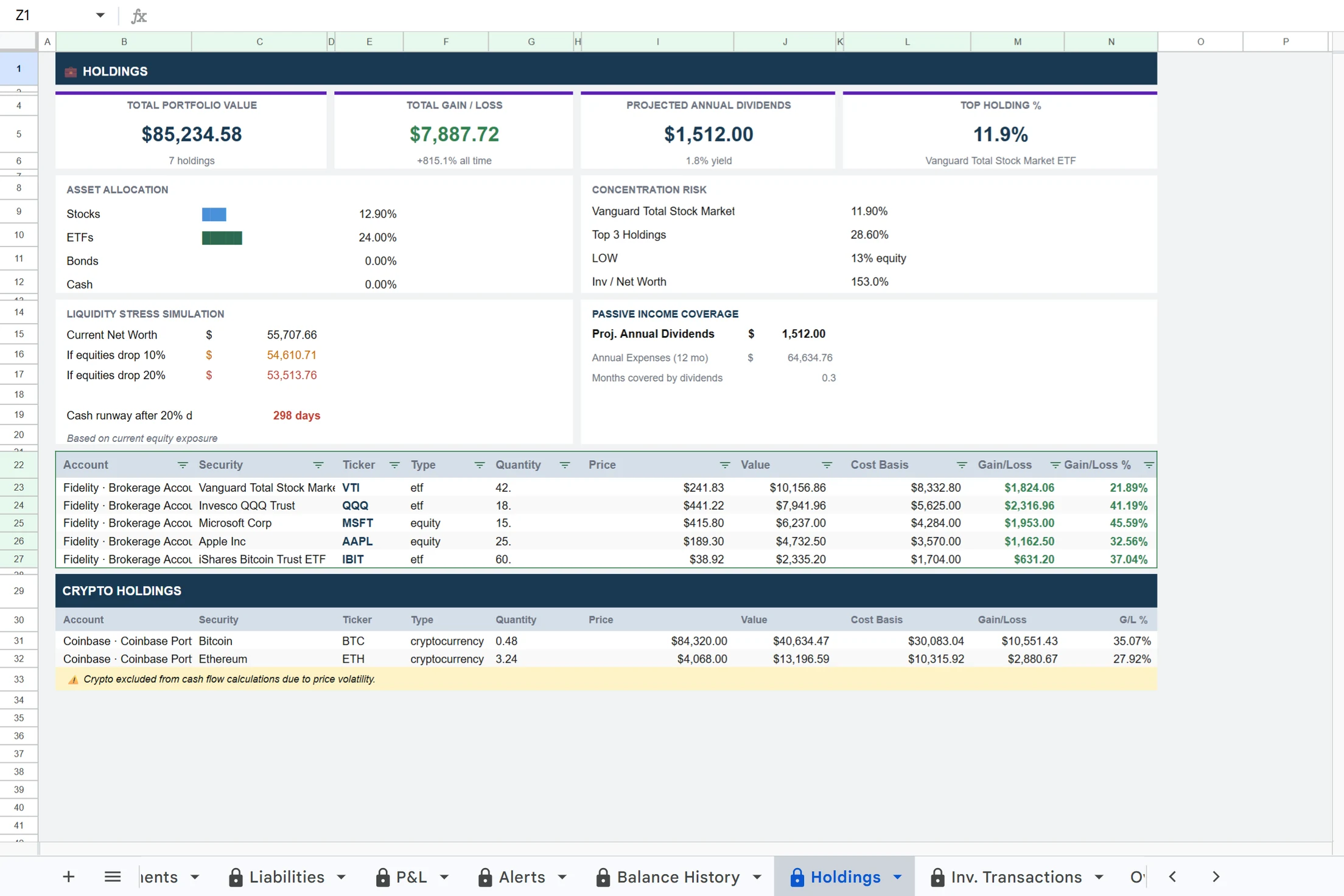
Crypto visible. Cash picture clean.

Crypto holdings appear in their own section — tracked and visible, but kept separate from your core cash flow metrics. Market swings won't distort your financial dashboards.

📈

Investment tracking included

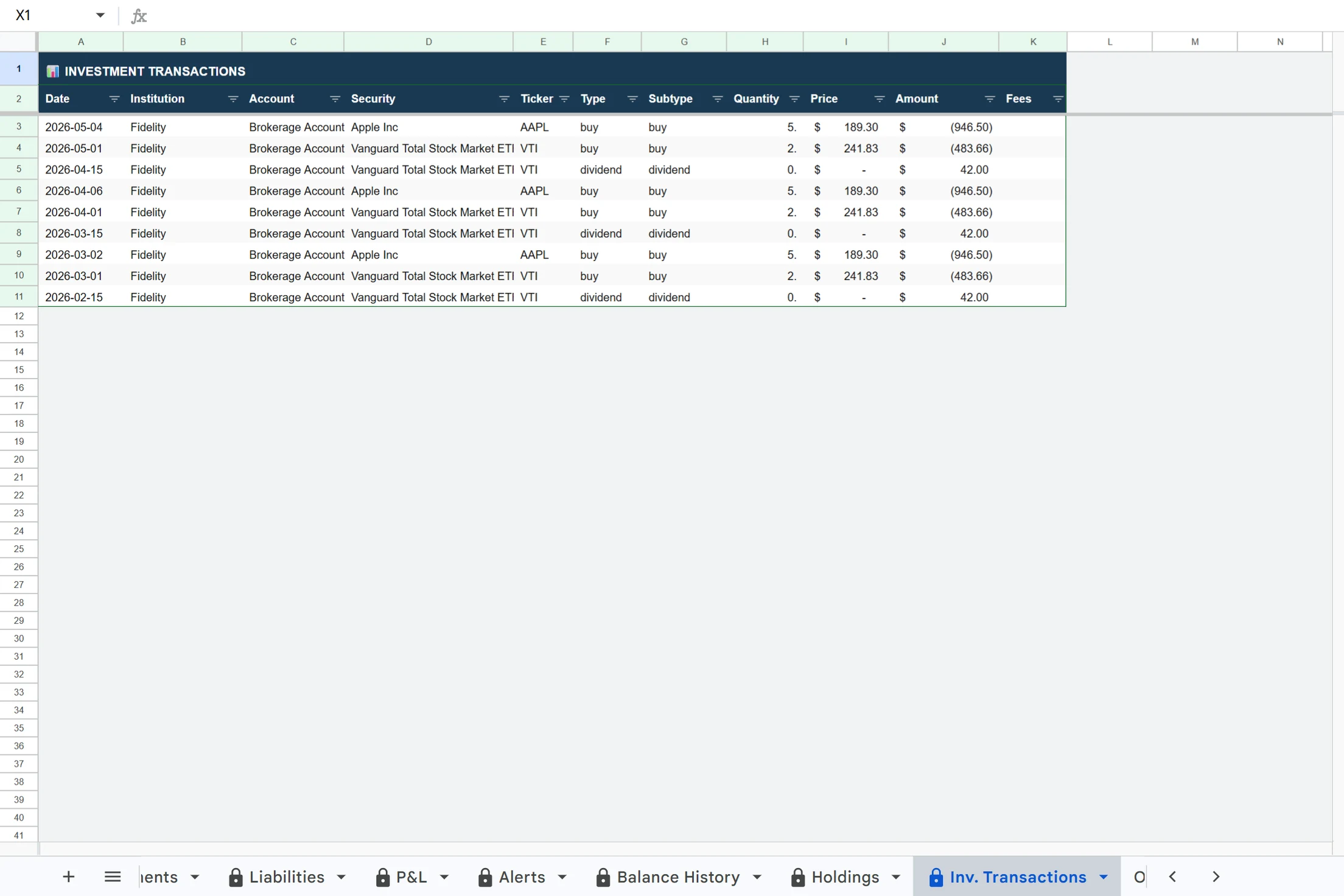
Track stocks, ETFs, and crypto alongside your banking data. See cost basis, gain/loss, and asset allocation directly in your spreadsheet — synced automatically from connected brokerage accounts.

Typical users earn $50–150/year in credits from stores they already shop at — enough to cover most or all of their Finsemble plan cost.
Comparison

Why not just use a budgeting app
or accounting software?

Finsemble Typical budgeting apps
Your data stays in Google Sheets
Fully customizable with formulas
All accounts in one unified view
Plans from $4/month
Works with your existing Sheets setup
Works with accountants who already use Sheets
Your spreadsheet lives in your Google Drive
Multi-currency with live exchange rates
Crypto visible without skewing cash metrics
Subscription can pay for itself via cashback
Finsemble
Your data stays in Google Sheets
Fully customizable with formulas
All accounts in one unified view
Plans from $4/month
Works with your existing Sheets setup
Works with accountants who already use Sheets
Your spreadsheet lives in your Google Drive
Multi-currency with live exchange rates
Crypto visible without skewing cash metrics
Subscription can pay for itself via cashback
Typical budgeting apps
Your data stays in Google Sheets
Fully customizable with formulas
Plans from $4/month
Works with your existing Sheets setup
Works with accountants who already use Sheets
Your spreadsheet lives in your Google Drive
Multi-currency with live exchange rates
Crypto visible without skewing cash metrics
Subscription can pay for itself via cashback

Works alongside QuickBooks or Xero — not a replacement. Finsemble is your data pipe into Sheets.

Your data lives in
your Google Drive.

Most finance apps lock your financial history inside their platform. When you cancel, it's gone — or trapped behind an export button.

Finsemble writes directly into a Google Sheet you own. Modify it, add formulas on top, share it with your accountant, or export it anytime. Your financial data is yours permanently — not held hostage by a subscription.

🔒
Read-only bank access via Plaid

Finsemble can read your transactions. It cannot move money, initiate payments, or modify your accounts in any way.

🚫
We never store your bank credentials

Your login details go directly to Plaid and never touch Finsemble's servers. Bank-level encryption throughout.

📂
Data in your Drive, not ours

Your financial sheet lives in your Google Drive under your Google account. Finsemble writes to it via OAuth — we can't access anything else in your Drive.

🔑
Revoke access anytime

Disconnect your banks or remove Finsemble's Google access in seconds. Your sheet and all its data stays in your Drive.

Who it's for

Built for people who already
manage finances in spreadsheets

💼
Freelancers

Separate business from personal, tag income by client, and keep clean records ready for tax season — without building any of it yourself.

🏢
Small businesses

Build a real financial dashboard without accounting software. Get structured cash flow, recurring costs, and budget tracking — all in a Sheet you already own.

🧾
Accountants

Receive clean, structured transaction sheets directly from clients. No exports, no CSV cleanup, no chasing data. It's already in Google Sheets — where you work.

Not a budgeting app.
Not accounting software.

Finsemble is a Google Sheets automation layer — it connects your financial accounts to a spreadsheet you own and keeps it current. That's it.

Not another place your data gets trapped

No proprietary dashboard. No platform lock-in. Your data lives in Google Sheets, permanently yours.

Not a replacement for QuickBooks or Xero

Finsemble works alongside your existing tools. It's the data pipe — not the accounting system.

Not a budgeting app you have to learn

No new workflows. No new interface. If you already use Google Sheets, you already know how to use Finsemble.

Stop entering transactions manually.

Connect your bank accounts and see your finances in a Google Sheet — automatically.

11-day Pro trial · No credit card required  ·  See pricing →

Frequently asked questions

Does Finsemble work with my bank?
Finsemble connects via Plaid, which supports over 12,000 financial institutions in the US and Canada, including Chase, Bank of America, Wells Fargo, Citi, Capital One, and most credit unions. If your bank supports online login, it almost certainly works.
Is my data safe?
Finsemble uses Plaid for bank connections, which provides read-only access only. Your bank credentials are never stored by Finsemble. Your financial data syncs directly into your own Google Sheet in your Drive. We never store your transaction data on our servers.
Do I need to know how to use Google Sheets?
No. Finsemble creates a fully formatted sheet for you automatically. Everything is set up, labeled, and ready to use. You can open it and understand your finances immediately, no spreadsheet experience needed.
What happens if I cancel?
Your sheet stays in your Google Drive exactly as it is. Every transaction, formula, and tab remains intact. Sync stops, but your data is yours permanently.
How long does setup take?
About two minutes. Connect your bank via Plaid, Finsemble creates your sheet, and your first sync runs automatically.

Resources

Bank Transactions to Google Sheets Google Sheets Finance Dashboard Small Business Expense Tracker Plaid + Google Sheets Auto-Sync Bank Data to Sheets QuickBooks Alternative Household Finance Tracker Net Worth Tracker Budget Template Freelancer Finance Tracker Investment Tracker Multi-Currency Budget Subscription Tracker Recurring Payments Tracker Small Business Cash Flow Share With Accountant Connect Bank to Google Sheets Auto-Import Transactions

Compare

Tiller Alternative Mint Alternative YNAB Alternative Monarch Money Alternative BankToSheets Alternative Tiller vs Finsemble Mint Replacement

Templates

Personal Finance Dashboard Household Budget Template Net Worth Tracker Subscription Tracker Startup Runway Tracker Freelancer Income Tracker Self-Employed Tax Tracker Business Cash Flow Investment Portfolio Rental Property Tracker Zero-Based Budget Couples Budget Agency P&L Accountant Dashboard All Templates →